
All posts by Jim Trottier

Lego Worlds / 365 Days – Day 008

I must be in my second childhood. Either that or I’m still in my first one. I love Lego games. Lego Video Games, to be specific.  I have dozens of them on several different platforms, with PC recently becoming my platform of choice for playing them–primarily because I can play most of them in three-screen “surround” mode.  This gives me the closest I’ll probably ever be able to get, personally, to a VR Lego experience.  With my one bad eye, I just don’t get the whole VR experience with real VR when I’ve used it.  I just get a headache after and hour inside that world and things get really blurry.  But with three regular screens providing one very very wide game screen, I think I get close enough to that experience and I can enjoy it for many hours at a time with no blurriness or headaches.

My favorite Lego game is still Lego Worlds.  I’ve been playing it for years.  Other players complain that it’s very limited and just the same old stuff over and over and just a grind to reach the 100 gold bricks required to unlock all of the tools to play the game, and I guess they think that’s the goal – 100 gold bricks and you’re done.  I disagree.  That’s what I would consider the FIRST goal.  Unlocking all of the tools is essential, yes, but that just enables the ability to do everything in the game.  There are still hundreds and hundreds of other items to acquire in the game–minifigs, brick builds, brick types, etc., and all of those enable even more things you can do in the game, including building entire worlds of your own if you want to.  It’s truly unlimited, with an almost infinite amount of procedurally-generated worlds containing any amount of mix between many different biome-types (old west, Christmasland, Candyland, the moon and many more–or even just start with a completely flat, empty landscape and go nuts!).  It allows you to bring any of the minifigs you discover to life, dropping them into any world or your own worlds and interacting with them all you want.  Give them an army of vehicles and weapons and see what they do… Spawn a hundred zombies and watch them swarm… I love it.  I’ve played Minecraft and I know how awesomely huge that game has gotten, and that’s great.  I’ve playing in there for hours on end as well, but I lack a lot of the creativity that it demands.  You only have simple square blocks to build your worlds with in Minecraft.  Sure, there are tons of different types of those blocks to work with, and even many more you can craft by mixing them together, but in the end you still have to build things one block at a time and to me it’s just too tedious and I can’t seem to create anything worthwhile without spending way more time than I have trying and re-trying until I get a result I like.  Sure, Lego Worlds allows you to build brick-by-brick, just like you can in Minecraft, but that’s just the beginning.  You can instantly place complete “brick builds” anywhere you want, which are previously-built structures of Legos, making it simple to create a world to your liking in a very short time–or take you time to get everything perfect.  You can even build a nice structure or area (for example a park) and save it as a brick build to use in another world or in the same world as many times as you like.

Anyway, that’s the gist of Lego Worlds.  I have many (most) of the other Lego video games as well, but none are as free-playing and open as Lego Worlds is.  Most of them offer their own unique worlds that you can eventually free-play in, once you reach their main game goals, and the stories and voice acting is great and much different, but I always come back to Lego Worlds.  I seem to be in the minority though, and I just can’t figure out why.  Here’s my Lego Worlds stats on each platform I play it on:
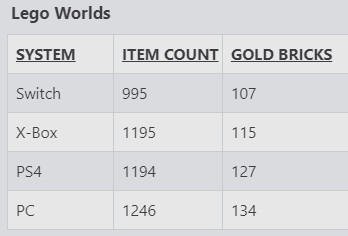
I’m currently working hard on the PC version, always trying to inch closer and closer to obtaining 100% of everything. I’ve never been there, but maybe some day I’ll have 100% of something at least. On all of the console versions my game save has gotten corrupted at one point or another, forcing me to start over completely from the beginning.  The console versions also have limited number of worlds you can have saved at once, then you have to start cleaning up and deleting old worlds before you can save any more.  The PC version has never corrupted my save though, it has always worked and I haven’t ever had an issue with running out of save space for new worlds.  I think I have hundreds of worlds created in it now, and I’m always creating more.  They form a sort of spiral galaxy, endlessly building out and around in an oval shape as you create more and more worlds, so it’s pretty neat. The PC version was also the very first to be released, if my memory serves me. There was a beta version for quite awhile and it was pretty undone back then, as I recall, but I started playing it anyway–without a controller. That was even before I started playing “real” PC games.

Android Windowshade / 365 Days – Day 007

This week I learned something new about Android’s Windowshade – the pulldown notification screen in Android 10. I like to listen to Spotify at work a lot, so I had a widget on one of my home pages for it so I could Like or Unlike songs as I listen to them to refine my library a little bit more each day. So as I was listening one day this week, I had the windowshade pulled down showing my current Spotify song and other recent notifications along with the current weather conditions, and I accidentally pulled down on the Spotify notification a second time. This opened up the details even further, now also showing the Like/Unlike option, the full album art in the background, and even the progress bar of the song playing!

Well, there goes my widget. I uninstalled it completely. It’s no longer needed, so I freed up that RAM and let it go. Very nice feature I never knew was there! I just wonder how long it’s been in there and I never knew about it. Now I’m realizing I can expand notifications for other apps as well–like e-mail… I can pull down the latest e-mail notification and see other recent e-mails I didn’t see come in. Sweet!

Hot Dog / 365 Days – Day 006

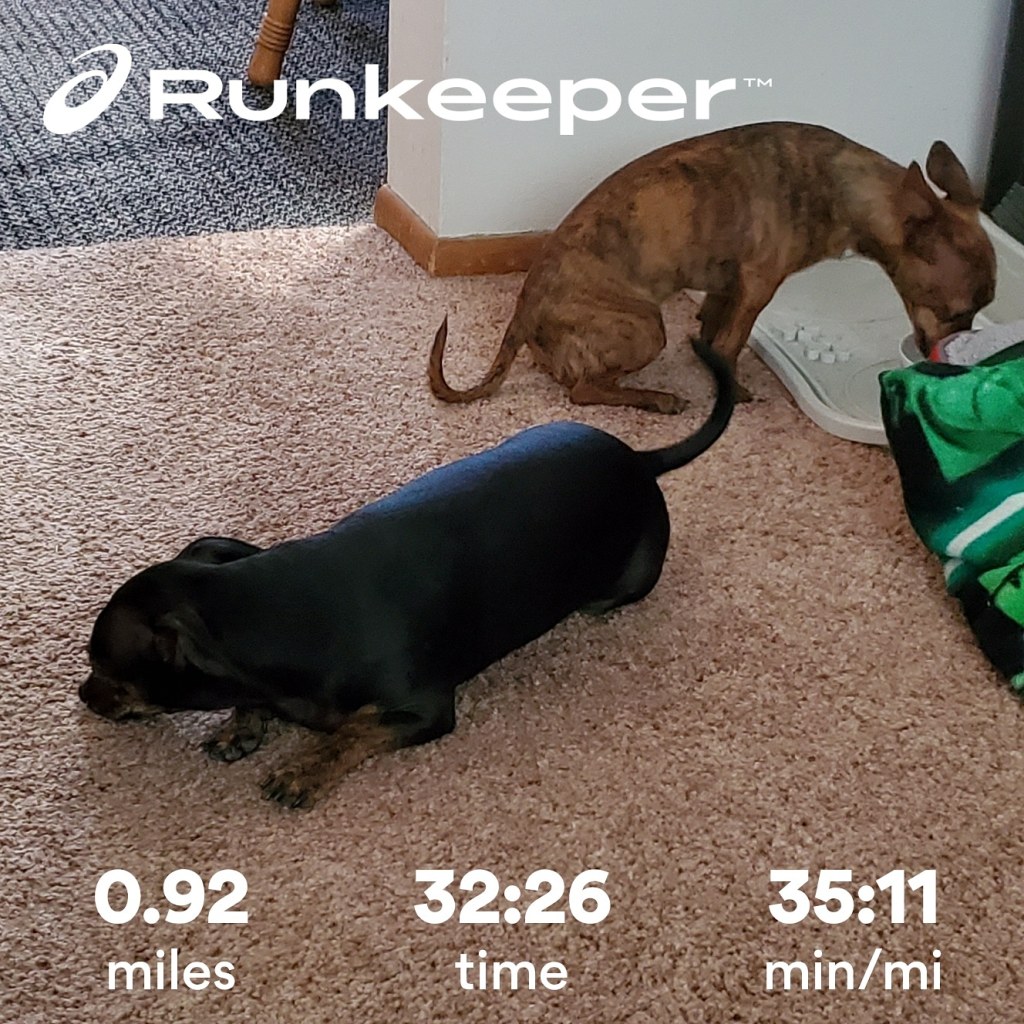
Shadow conks out only halfway through our one-mile walk

I took a half-day yesterday to take care of some personal business, so I walked the dogs in the afternoon. The temperature was decent, but apparently really hot in the direct sunlight, so Shadow only made it halfway through our one-mile goal before stopping under every shade tree he could find to lay down and take a break. Tiger, on the other hand, was always perky and ready to keep walking at all times, as usual. I felt bad for Shadow, but he loves his walks. Maybe he just needs a hat!

He spent the rest of the walk rushing through the sunlight, then sloooowly walking through the shaded areas and stopping for a breath whenever he could in the shade. In the sunlight I also noticed he liked to walk very close to me, like a well-trained dog. He’s done this in the past too. But during yesterday’s walk I realized exactly what he’s doing–he’s not following any training he’s never had…he’s trying to stay in my shadow, in the shade! I varied my speed a little, fast and slow, fast and slow while watching him and confirmed that’s exactly what he’s doing.

Here’s a couple more photos:

Right after we got home – Shadow took a long drink first, then rested while Tiger takes a drink.
…and a few minutes later they’re both passed out on the floor, exhausted. (Mr. Bill is relieved to live another hour without being chewed, squeezed and thrown across the house)

Website’s 20th year / 356 Days – Day 005

Wow, my website has been here for 20 years. Almost. About 19.5 years to be precise. Looking back at my first post, it was on January 7th, 2001. The world and I have been through a lot over those years. Some little things have been omitted though, I’m just finding, and others just weren’t posted, I have no idea why. I probably just never got around to them, planning on making more of a production out of them, but didn’t find the time, then forgot about them. It sucks when that happens, and I’ll try to find that stuff and post what I can as time permits, even if it’s way late.

Check this one out. I found this in the Wayback Machine. Somehow it never got posted here. Funny how I was posting in the 3rd person:

2/4/01 – Tomorrow Kevin turns 3 years old! We’re having his party at Bozzo’s house this afternoon.  His party has a dinosaur theme, and he’s getting dinosaur-related gifts.  Sandy and Jim got him the movie Dinosaur on DVD (Special Edition, 2 DVDs), some dinosaur wood puzzles, and a big plastic container filled with all sorts of dinosaurs.  

Jim’s using 5 messengers now — MSN Messenger, Yahoo Messenger, Odigo, AIM, and ICQ.  Sheesh! It’s not so bad though with 2 PCs on the internet at once–all the messengers stay on one PC and we surf the net and do other things with the other one.  It’s just experimental though, to see how all the programs work and what their differences are.  There’s an alliance forming among several of the major messenger services right now, so hopefully they’ll come up with a good unified solution… In the meantime though, Jim just likes to play with them and juggle between them until they break.

The blue car is in the shop this weekend–another head gasket blown.  That’s the 2nd hard gasket change for that car now, so it’ll be on it’s 3rd gasket. The black car is on it’s 2nd one as well, so I guess it’s just a thing you have to live with on Neons.  We’ve heard it’s a pretty common problem on Neons.

Our CD recorder died last week too. It just stopped refusing to record CDs one day, and then stopped reading CDs altogether. I opened it up, but could see nothing physically wrong with it.  So I’ll have to get another one of those along with a new DVD drive, which has been giving me trouble for some time too. That one occasionally refuses to read DVDs, and never wants to read CDs any more either…Maybe it’s me, but neither one of them wants to work any more no matter what I do.  I’ve even tried them in different computers with the same results. Oh well. Time to upgrade.”

Caching it in / 365 days – Day 004

Muwahahahaaaa. One nice thing about this goal is that I can cache as many days ahead as I want. Sure, even with WordPress I could pre-post and I actually did that a lot. Some days I have a burst of ideas and thoughts I wanted to write down and the time to write them out, so I would, then I’d post them on my website and give each posting a separate date to spread them out throughout the week. I can do that with Standard Notes now too, and it’s even a lot easier. As if I publish so much that having a few in one day would overwhelm someone. LOL. Thinking about it now I realize that was probably a little silly. But there, another day in the bank.

Men of Honor / 365 Days – Day 003

I re-watched Men of Honor (2000) over the weekend. Awesome movie. I knew I had seen it years ago, probably when it came out on video. Robert DeNiro and Cube Gooding Jr. I think I came back to this one as a result of a recent search I did for Michael Rapaport. Micheal is on the Howard Stern Show occasionally and is pretty foul-mouthed and insulting on there usually, verbally attacking other people on the show, so I wanted to see what other movies he had done. The only movie I could remember ever seeing him in was The 6th Day, with Arnold Schwarzenegger, which I enjoyed. So when I googled “Micheal Rapaport Movies” out of curiosity, Men of Honor came up and looked like probably the highest-rated movie of his out of all of those it listed. I’m not sure about the rest of them, but Rapaport only had a small part in Men of Honor, but I thought it was good. He played a stuttering character–someone he himself would probably make fun of in real life, judging by the way he acts on the Howard Stern Show. Anyway, good movie, just thought I’d mention it.

Our 24th Anniversary

Today, July 20th, 2020, marks my 24th Anniversary with Sandy, my wife, my better half, aka The Warden. She says she hates it when I call her that, then she says she misses my dad calling her that. He’s the one that started it, and it was with affection. He always knew she did everything she did just to help him. And she’s the same with me. I don’t think I’d even be here if it wasn’t for her. She has kept me on-track (or at least tried as hard as possible) with everything from eating healthy to making sure I take my meds accurately and on-time each and every day, and has always taught me over our 25+ years together that you always help others as much as you can, be kind and fair to everyone, respect your elders, be a good person, don’t hold a grudge, there are more good people in the world than bad, and never go to bed angry.

We’ve had a great time, and it has all gone way too fast! It seems like the older we get, the faster time flies. And these days we can hardly celebrate. We would normally go out for dinner at least, and even though some restaurants are fully open, we aren’t willing to risk it. Next year will be our 25th though, which is supposedly much more of a milestone, so we’ll be sure to celebrate that one at least a little better than this one.

Ready Player Two / 365 Days – Day 002

So I just found out this is coming out soon… the book and the audiobook.  I’ve already pre-ordered it.  They’re not saying much of anything about the story, just that it’s the highly anticipated sequel to “Ready Player One” and it’s 384 pages.  That’s precisely 2 pages shorter than Ready Player one.  I’ll be looking out for actual reviews once someone actually gets to read the story.  And I can only hope they got Wil Wheaton to do the audiobook!  I can’t imagine anyone else doing it better.

Website issues / 365 Days – Day 001

Ok, the site is back now after an evening of experimentation, confusion and frustration. The limitations of using just https://listed.to/@jimtrottier for my website is just too much for me (and a few other visitors). As it turns out, this site is simple enough and complete enough that it’s easier for me to just make the effort and post like “normal” people do, directly through my website, than do deal with all of the complexities of HTML all over again when I want something a little more than just words in a post, and without having to re-post my links to all of my other content in pretty much every single post.

To test how easy or difficult it is to post here, or just to see if I’m capable of accomplishing something geekily difficult, I’ve given myself a challenge I mentioned in the title and won’t mention again. No rewards, no reason, let’s just do this once and see what happens.

Oh, and I “cleared out” the “Listed” site too, so don’t bother checking that site anymore. Sorry for the confusion. Fortunately anyone who only visits my site once a week, or less frequently, won’t even notice that anything ever changed, they’ll just be reading and wondering what the heck that blank “listed.to” page is and why I’m rambling on about a few postings that aren’t even there, then they’ll read the rest and realize I came to me senses again, and reverted back to the old site. Then again, if they read my site top-down, they’ll see this first. My head hurts.

Blog

Standard Notes has an awesome feature that allows you to instantly publish any note to a public blag page with a single click. Here’s my blog page:

https://listed.to/@jimtrottier

Now I just need to figure out how to embed that page on this site. I thought that would be pretty simple, but it looks like it’s not. The listed.to site apparently doesn’t support standard embedding. For now, please click the link above. I’ll be posting entries there probably a lot more often than here.

Issues with Keep, switched to something Standard

Have I mentioned how much I liked Keep? I’m sure I did, it was a big deal (at least for me) when I cancelled by Evernote subscription and went with Keep as a totally free option and it worked out great for me. Sure, Keep lacked the fancy HTML formatting that Evernote has, but it was fast and pretty much unlimited. Keep also had a couple pretty nice features most other note apps didn’t–especially free ones. One was OCR. You could search for text with an image or photo and it would find it. And you could extract text from an image any time you wanted.

Well, all was bliss until a few weeks ago when I actually started using it much more. I had a previous post prepared in which I explained how I stopped using my little paper notepads at work, but for some reason that post never got published. I don’t recall exactly why. Anyway, I stopped, cold-turkey. No more pen & paper at all. Everything digital. ALL notes at work are now digital, which makes them that much more useful. That unpublished post explained in detail what happened that made me decide to go this route, but it really does help a lot–not only saving on paper, but in the new ability to search and find anything in an instant and to document my daily work in our ticket system for the rest of the team to be able to search and find.

But, as I said, things also took a turn around that same time, or I just never noticed the issue before because I never used Keep quite so much. Here’s the issue: Since I’m typing notes into Keep much more often now, I have become much more aware of how it constantly saves everything to the web on-the-fly, as I’m typing and working. It constantly tells you this at the top of the Keep screen. Well, right around the day I started using it much more, it would occasionally pop up a message at the bottom of the keep screen that says “can’t connect right now, try again later.” I can understand that happening once in awhile due to maybe a server issue down the line, my internet connection, or maybe my corporate network connection at work being glitchy. It happens sometimes. But when this happens, Keep halts my typing. It lasts about 10-15 seconds, sometimes a bit longer, maybe up to 30 seconds being the longest, and I can’t type anything at all into Keep during that time.

When I’m on a phone call or working on an issue and trying to document everything at the same time, this can get quite frustrating. Like I said, it wasn’t bad when it was just once in awhile, but over the past week it has become constant. In pretty much every note I take there’s forced pauses. It drives me nuts now. I just don’t understand how Keep can’t allow the user to keep typing and just cache the unsaved data until the connection becomes available again, then save it. I thought that was the reason they have the constant notification at the top of the screen–so you know when your current work is or is not saved at the moment. I don’t think there’s any point to having that if you can’t even type anything in when you’re NOT connected to the internet.

Anyway, it became too much. I searched the web plenty of times and others have had this issue with Keep since 2017 or 2018. I’m not sure if it stopped their typing at that time, they didn’t mention that aspect of the issue, but this is my experience, and if it has been happening for a few years I’m shocked nothing has been done about it.

Maybe the Keep servers are overloaded now, with so many people using the free service these days, I don’t know. So I went on the hunt, yet again, for another decent free, or inexpensive, alternative note app. I tried a few more and would up with “Standard Notes.” It’s a simple app, much like Keep, completely free, but with a desktop app as well and a “Expanded” option for a small fee (or a LARGE fee if you only pay monthly). If you buy into their long-term 5-year plan, it’s only a little over $2/month. Pay only monthly and it’s $9.99/month. Huge difference. But the benefits of “Expanded” are plentiful. You get a 30-day money-back guarantee on the 5-year plan, so I’m into that right now, trying everything out and giving it a run for my money.

So far, so good. It lacks the OCR abilities that Keep has, but I can still use Keep for a few minutes at a time whenever I need to just pull text from an image, then save that text in Standard Notes. Everything else, however, is there and then some! It does the same on-the-fly saving of my notes, but without interruption at all, from what I’ve seen, and it offers full editing capabilities in may different tasty flavors I like, such as full HTML editing and even a full Coding editor complete with line count. There are plenty of other extensions to add details to the program like work count and other stats, printing of notes (which you would think is a given, but Keep never had it–I had to export a note (or several) into Google Docs and then I could print it. And it was pretty easy to use Google Takeout to extract all of my Keep notes, then use a plugin that Standard Notes Extended has to import those into Standard Notes. We’ll see if it holds up for the full 30 days, or if I get my money back. Right now it’s looking pretty good.

Spectrum Solicitor

Wow, even the cold callers are rude these days. I got a call today that came up as SPECTRUM on my caller-id and was an 800 number – (800) 892-4357 to be specific. I’m still waiting for 1GB to come to our area, so I answered it. A guy with a very thick Indian accent introduced himself and said he’s calling to lower my internet, TV, and telephone price. He said “You’re paying over $100 a month right now, right sir?” I said “No, I’m paying $96 a month and I only have Internet.” He immediately hung up on me. No goodbye, no thank you, nothing but a very loud click. Pretty impressive for a solicitor. You usually have to work hard to get them off the line. I take that as a sign that I have a decent rate for my 400 mbps connection.

YouTube Music

YouTube recently announced that they’re getting rid of Google Play Music and going with only one streaming music service: YouTube Music. So I’ve been playing with YouTube Music more lately, trying to use it as a replacement for Spotify to see if it makes the cut.

So far, I can see it has some limitations, but it also has a few nice features that Spotify doesn’t. One of those is lyrics. I haven’t found a song with lyrics yet that doesn’t have the lyrics right there up-front when you’re on the song in YouTube Music. And they’re just straight-up lyrics too, not the gimmicky “Behind the Lyrics” thing that Spotify has, which shows you just a few lyrics then gives you little bits of trivia about the song or its artist as the song plays.

There’s also an “UP NEXT” button which shows you the playlist of songs queued up to play after the one you’re listening to. And, because it is YouTube Music after all, there’s a video for just about everything, so they include a simple slider at the top of the app (I’m referring to the Android app) to switch between “Song” and “Video” at any time.

And just as Spotify does, as you add songs, albums and artists to your library you get suggestions for music you might like, and I’m YouTube already knows me pretty well and I’ve discovered a lot of new stuff I like in it.

The only thing I find a little annoying is how there isn’t a separate app for YouTube Music on some devices, like Roku. On Roku YouTube Music is embedded in the YouTube app. You open YouTube and then choose “Music” from the menu, and that’s YouTube Music. It kinda makes sense, I just find it harder to find since it’s not consistent–on my phone it’s a separate app. If I’m in the YouTube app on my phone Music isn’t an option. Maybe Google’s still working on that though, I don’t know.

Lastly, YouTube music also has “Smart Downloads”. It will automatically download your liked music overnight when you’re not using your phone. You just have to choose how many songs to allow (up to 500) and the quality, and it takes care of the rest. You can also choose video quality.

Overall I really like it, and maybe soon I’ll drop Spotify. Right now I’m kinda stuck, because Kevin is a big fan of Spotify and doesn’t want me to get rid of it, and we’re on a family plan, so if I drop it, he’ll lose his access. I’ll keep both for now and we’ll see how it goes down the road.

Windows 10 Launcher Quest

I’ve been on sort of a “Launcher Quest” lately, looking for the “Best Launcher” for PC that’ll let me quickly play any game on the PC I use solely for gaming. There are a ton of “Top 5” or “Top 10 Game Launchers” out there, so I started with a few of these lists. Here’s an example:

I won’t list any others, but there are a LOT of these lists, and they’re all completely different. Most of these lists usually end up having one or two top launchers that the others have, and these are the most popular ones. I found a lot of issues with many of them, and some were actually pretty good, but none of them were quite what I was hoping for. They all had limitations in some way, or were difficult (or impossible) to add certain types of games, but I tried many of the top picks from several lists as well as a few others that sounded interesting.

End Result: I’m using FENCES. This wasn’t even on ANYONE’S recommended Launchers list and isn’t even considered a “Launcher”, it’s more of just a desktop “add-on”, but I wasn’t able to find ANY actual launcher that supports all of the different game sources I use, and Fences supports unlimited Fence Desktops and literally ALL game sources (and apps) that I use, so it’s a clear winner for me. It doesn’t have any 3D or other “bells & whistles” that the top lauchers do, but I don’t care, it works and it works quite well for exactly what I need it for.

Since I use all 4K monitors (and one 4K TV) on my PC, I just set the icon size to “Large”, which makes them very easily viewable on all of my monitors and my TV, then I just created as many different Fence Desktops as I needed, and grouped by icons accordingly, with separate fences for “Apps”, “Currently Playing”, “Emulators”, “Mini Games”, “Misc. Games”, “Google Earth”, etc., then I can simply grab the left or right edge of my screen to flip to the previous or next desktop as needed. Since I can have an unlimited number of desktops and fences, my options are wide open, and every single game source is supported! The Google Earth Fence might sound odd, but I love it! I save an icon for every interesting place I want to–like my home, my work, and other interesting places on the planet and I can instantly just open any of them up and explore the area–in 2D or even 3D, or even drop down to street view and look around. In 4K this is really sweet to play with.

But back to Fences–I can even add apps and games installed from the Microsoft Store… I simply created a shortcut to “explorer shell:AppsFolder”, then whenever I need to create a shortcut to a native Windows 10 “tile” app I just open that “Windows Apps Folder” and find the app icon, right-click it and “Create Shortcut”. Windows then prompts me saying it can’t create a shortcut here, do I want to create a shortcut on the desktop instead?” I say Yes, then I just go out to my current desktop’s default Fence, grab the icon, and drag it to the Fence I want it in.

I can even color-code each of my Fences any way I like and change their behavior and appearance in many other ways as well. For me, I haven’t found any other PC “Launcher” that works as well as Fences for everything I need a launcher to do.

As far as what was missing from ALL of the launchers I look at and tested, “BigFish” was one of them. Some might laugh and might call this one a joke, since it’s probably not even considered a “real” game distributor, since they only sell mostly “mini games” that were much more popular “back in the day” with much earlier versions of Windows, but I really enjoy a lot of these and still have a monthly subscription to a few of them, which means I have amassed dozens, if not hundreds, of games on their platform, so it’s relevant to me, but apparently not very popular these days as none of the “top launchers” in everyone’s recommendations support this service’s platform or its games. I just love me a simple game of BrickQuest, Slingo, or Fishdom now and again.

Always Sunny

I started watching this show recently (full name: “It’s Always Sunny in Philadelphia“) after hearing it mentioned many times on reddit. Netflix also recently pulled an episode from Season 8 due to its controversial racial content, which really sucks, but I got it elsewhere, so I still have that particular episode–and just another reason I don’t have Netflix. Why would you want to basically “cripple” a TV Series you host, making it “incomplete” just because it has a little controversial content someone complained about? Heck, South Park, Family Guy, Rick & Morty, and many other shows wouldn’t even exist without controversial content! What ever happened to Free Speech?

Anyway, Always Sunny is still an active series and it started in 2005, so they have 14 seasons in the bank and have been renewed for a 15th, so how bad can it be? That’s how I look at it, and I’ve watched a few episodes of Season 1 and wasn’t disappointed. I’ve already seen several “controversial” things in it that some people would be offended by. That’s the show. It’ll be interesting to see where it goes. The show sure is “gritty” and right to the point, that’s for sure. Danny DeVito has been in the cast since Season 2, and he’s hilarious, so I’m looking forward to see how much funnier it gets when I get past Season 1.

Mr. Brooks

Yesterday I found this old movie that looked good which we hadn’t seen, so we watched it last night. It was really good. It stars Kevin Costner, Demi Moore, and William Hurt. It has a 7.3 on IMDB, which made me choose it over a few other new releases I’ve been meaning to watch. A 7.3 on IMDB is fairly good, and it didn’t disappoint. IMDB’s description is about all you need: “A well-respected businessman is sometimes controlled by his murder and mayhem-loving alter ego.”

Keep Site

I think I’m going to turn my website into pretty much my own public version of Keep. I use Keep for every little thing I note–at work, at home, when I’m away… If it’s something big I need to document or the tiniest little thing like a song title that I want to remember, it goes into my Keep (that’s Google Keep, for those unfamiliar). My Keep is everywhere–on the web and on my phone, and I have links to it on every PC, tablet and phone I use so I don’t forget anything I wanted to save to recall later. Like the Internet and Google, it’s just there.

So I’m going to start frequently going through my most recent Keep notes and posting them on my website. What the hell. If nothing else, it’ll at least show something different on my website much more often than it has over the past several years. I already often type up my website posts in Keep anyway, because it’s so convenient and comes up instantly, as opposed to opening WordPress on my phone or opening my website’s back-end on the web, which both actually only take a little bit longer to open, but longer nonetheless. Besides, it’ll open my notes up to a bigger audience. Who knows what that could do? Let’s see if it gets me into any trouble. All I gotta do now is accidentally post a private note in the wrong place and off we go…

I’m not as smart as you think I am

Did I say that right? Or is it “I’m not the smartass you think I am”? Being a geek working in IT (both at my job and when NOT at my job), I get asked a lot of technical questions. I’m happy to answer them, but many times my answers don’t come from just me. I often google the question, then pass that information on in my own words, making it seem like I am an all-knowing supergeek, when, in actuality, Google is.

It always amazes me how Google can translate even the most confusing and misspelled sentence or question into exactly what you were trying to search for and give you 1,254,233 relevant search results in a split second. Granted, most results beyond the first page are totally useless and are only based on a key word or two in your original query, but they are related in a small way.

That first page–and usually the first or second link on that page–most likely contains exactly what you were seeking. It’s like an ever-expanding infinite encyclopedia that combines the knowledge of everyone who posts anything on the web–basically the entire world’s connected population. My mind boggles.

Remember actual Encyclopedias? I remember collecting several complete sets. There were like 20 or 30 volumes in a complete set, and you often got them one at a time, starting your collection from an “Encyclopedia Salesman” who went door-to-door selling them like they did vacuum cleaners. You’d get a new volume each month and your parents paid for it. Or sometimes you could get a volume or two at the grocery store each shopping day to add to your set until you completed it. I don’t remember how much they costed, but I’m sure it was pricey for the time. But it was knowledge, and my parents, though reluctant and not wealthy, invested in them for the family’s cumulative educational benefit. I ate them up. We even bought a huge two-volume “Complete Dictionary” set that included a “younger” version of dictionary with many illustrations and artwork and a grown-up, very compact small-print dictionary containing every friggin’ word ever imagined in the English language. But no slang. No “urban dictionary” nonsense back in those days, that’s for sure.

That was my “Google” back then. Am I showing my age? Whatever, that’s my history and I’m proud of it. It made me who I am today. It gave me that thirst for knowledge that had never been fully quenched. And today’s Google is just a gazillion times (or a googol) larger and that much more awesome than it was back then. Yeah, that’s spelled right, look it up.

So back in the day, I’d run to the bookcase and grab the relevant volume for the letter of the subject I wanted to find out more about, look it up and soak it in like a sponge. Today I just open a browser on a computer and type in my question, or just pull my phone out of my pocket and thumb it from literally anywhere. Knowledge is what? Power? Then Google is the most powerful entity ever created. Or the Internet is, I’m not sure really… How good is the Internet without Google? It’s Alta Vista. Not so good.

I can’t imagine a world without the Internet now, but I worry, with the current pandemic now seeming to subside, that something much worse could easily take it all away. We need to appreciate what we have much more than we do. It could all just be some geek’s weird wet dream that could vanish in an instant when he wakes up.

If It Bleeds

I’ve been enjoying Stephen King’s latest book, “If it Bleeds”. I’m listening to the audiobook on during my commute to and from work. Since I was working from home when the book was released, I’m a little behind with this one. I finished the first two stories and I’m on the third now.

The first story was interesting – it’s about an iPhone – the old 1st-Gen version that was a little buggy.

The second story was just plain irritating. The story might have been much better if King hadn’t decided to do the entire thing BACKWARDS. That’s right, it goes from Act 3 to Act 1, telling the last part of the story first, then the middle, and finally the beginning. It’s an end-of-the-world story, so I started out pretty confused and not knowing what the heck anything was he was explaining until somewhere in the second act, when I fully realized everything was being told in reverse. So by the end of the third act I realized more and more clearly what’s going on, but I had to re-assemble things in the correct order in my head just to put some sense to it. It ended up being just a bit too confusing for me to enjoy and appreciate the story much, so I’m thinking about re-reading that one, maybe in actual book form this time instead of as an audiobook, but reading it in the correct “act order”. I’m curious if this will reveal some hidden flaws in the story, or if King actually wrote the story in the correct order, then just decided to publish it backwards. I don’t think he’s ever done that before. I’m not sure what the point was.

Right now I’m in the middle of the third story, which is the book’s actual title, “If it Bleeds”. It’s the longest story in the book and I’m really liking it. It connects the 3-book Mr. Mercedes series, The Outsider, and this story together, all intertwined. The main character is Holly Gibney, who was in all of those books. I’m looking forward to the last story too, which is “Rat”. I think the creepy cover design for the book is a clue to that story. We’ll see.