Category Archives: Technology Links

Updated “Best Handheld Ever”

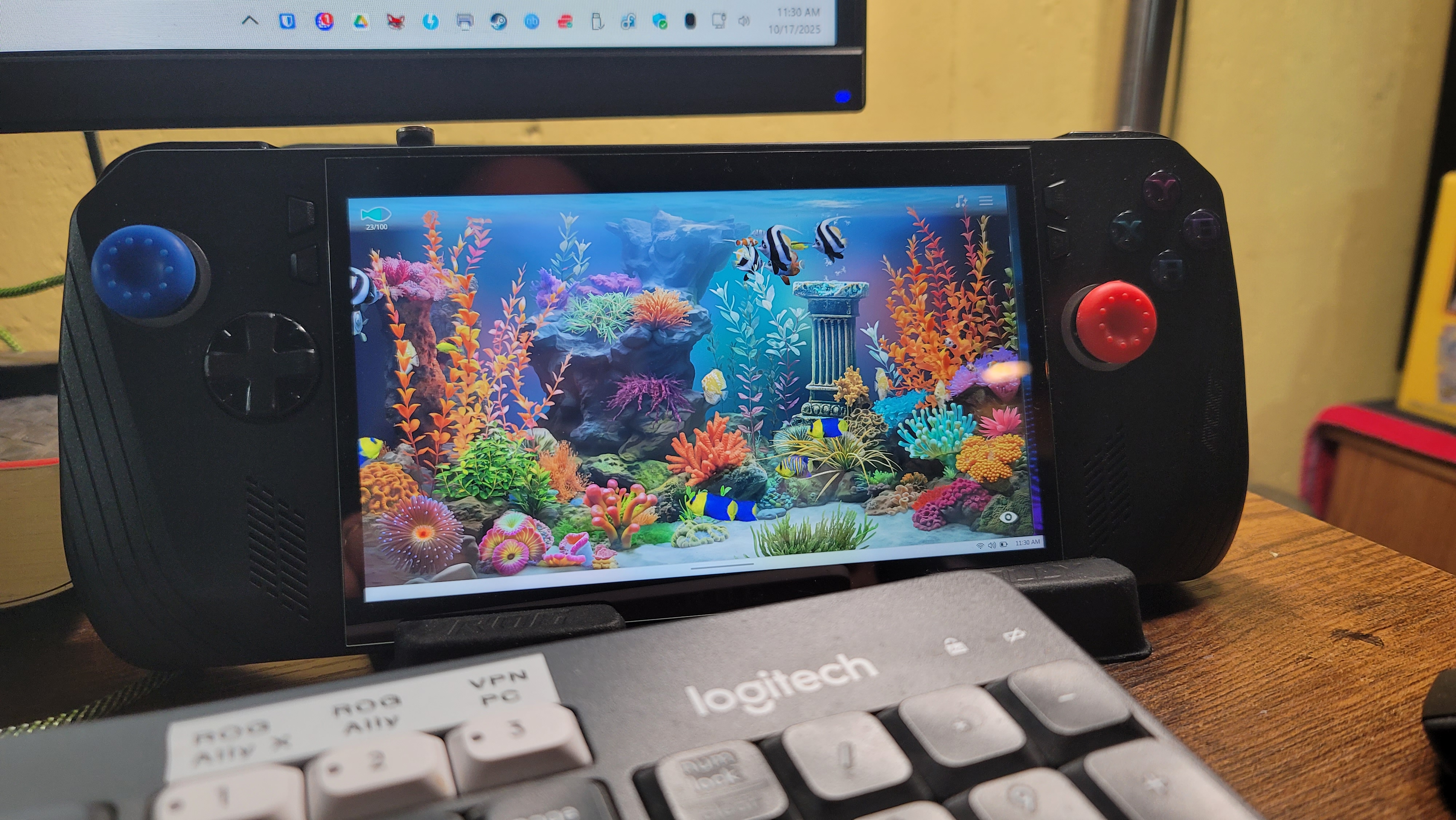
A few posts back (but over a year ago) I wrote about the best handheld PC I’ve ever had. Here’s the link to that post. Well, now there’s a new one. This one looks almost exactly the same as the white one in that photo, but it’s black. It’s the ROG Ally X, and it’s the next iteration in the ROG Ally series. It’s not the most recent, but only one generation older than the latest version, which is called the ROG XBox Ally and the ROG XBox Ally X.

They changed the case just a little and modified the back buttons based on user suggestions and all the minor changes are nice. This model is a little thicker than the ROG Ally, not not too thick as to make it more difficult to hold while playing.

One nice advantage to the thicker case is that the SSD is now a standard size and it also has room for an SSD heatsink – this means it can handle ANY standard SSD. So everyone’s touting the 2TB, 4TB, and 5TB SSD cards as great upgrades. I took it to the extreme though and bought the max – 8TB. Yes, it was a bit pricey, but for me it’s my dream machine now. It holds close to 200 of my favorite games and my entire retro collection – THOUSANDS of retro console and arcade games!

With a nice 1080p 7″ display, this is everything I could want in a handheld. Every game I’ve ever played in my gaming PC I can now play in my hands, anywhere. The battery is even better than the ROG Ally, and it’s more optimized, and since the X-Box version has recently released, the built-in control software, Armoury Crate & Command Center, has recently been enhanced quite a bit with new features and functions, aligning it more with X-Box. The X-Box features don’t interest me much overall, as I’m not a subscriber, but I like and own a lot of the X-Box games, so the more the better.

I’m not sure I ever posted anything about this, but a couple years ago I sold my huge collection of games, consoles, and accessories. I had a few Playstions (3 and 4), a few X-Box versions, and even a Wii and Wii-U, as well as many accessories and physical games for them. They all sold pretty quickly and I freed up a lot of space in my mancave. This makes the retro collections, and the ability to play my games anywhere I want even that much more valuable to me.

I had to keep my Nintendo Switch, as the Nintendo games (like Mario, Kirby, etc.) aren’t available for PC like most other games are – they’re locked to Nintendo (except their older emulated games) and I still wanted access to them. Pretty much everything else I enjoy to play is available in a PC version. So now I’m down to two platforms – PC and Nintendo – and most games are digital as well, so I’m saving a lot of space at home.

Anyway, that’s my update. If you have any comments or questions, I’m checking my site much more often now, so feel free to post a message. I believe my site will also e-mail me whenever anyone posts a comment, I’ll be notified fairly quickly.

Thanks for visiting!

Gaming Geezers

My view of “The Toads”, as we refer to them in Ingress, has changed a bit over the years. I’ve been playing Ingress for over 5 years now, as a Resistance player (blue team). We fight “The Toads” (the green team – The “Enlightened”) day after day to dominate our individual areas, and ultimately, the Ingress world. Ingress is a virtual world that exists as an overlay on top of our real world. Using GPS, it’s a global “capture the flag” game, as both teams work to cover the earth in their color–blue or green.

I used to hate seeing green and would often strive to remove all green portals and fields I could find, then turn that same area blue for our team. I still do that, but these days I no longer “hate” seeing green. It now seems more like an invitation, a “proof of life” if you will, that there’s still a load “toad” out there, eager to fight for their team. Nowadays I actually get a little thrill when I see a cluster of local green portals (a “farm”), as it gives me a purpose during my daily walks. When I find one of these areas, I will often scout the area and try to determine the best possible walking route to combine a decent walk (1 mile minimum is usually my goal) with the most efficient route to destroy and rebuild all of the portals for our team.

This, along with the fact that our team has dominated the Kenosha, WI area for quite some time now, has made me realize that, like other multiplayer games, Ingress isn’t much fun without a good balance. Though the goal is to dominate, it is very difficult to maintain your area for any length of time. At least in Ingress it is. It requires constant attention to your portals–almost daily–to avoid having them decay to the point of their resonators dropping off of them and their fields and links dropping. This is where teamwork becomes very important. I have tried, many times, to maintain as much of the Kenosha area as possible over the past 5 years, but I have always ended up frustrated in the end, seeing portal after portal and field after field drop and go neutral.

This has taught me, in the end, that once you dominate a large area, it’s much easier to just let things fall, then rebuild them fresh again, instead of trying to keep everything charged yourself. If none of your teammates is willing to commit to the same area and help maintain it, it is way too much work (and too frustrating) for one player to maintain on his or her own. This can (and has) even lead to many players quitting the game. Everyone has to work out a playing strategy that works for them–one that keeps the game light and fun. After 5 years, I think I’ve found my preferred playing techniques and favorite areas I like to play in the most.

You’ll find my areas sometimes netral, other times fully blue and fielded. It depends a lot of my schedule and free time, and a little on the price of gas. I try to play while walking as much as possible (doctor’s–and Niantic’s–orders). It motivates me to walk more, giving me something to do along the way, and I often find that I walk further than I originally planned to…which is a good thing! I have lost a bit of weight Ingressing over the past 5 years, and the benefit of that, alone, outweighs (pardon the pun) any of the in-game benefits, and the toads certainly can’t take THAT away from me!

I had originally intended this article to be more about multiplayer games in general though, and how these types of game just don’t work unless they have their primary ingredient: Players. One example I enjoy is Joust. This is a classic arcade game from the 80’s, and was a key game from the novel “Ready Player One” (but wasn’t in the movie at all). These days I like to play this game on my X-Box One. This game has awesome multiplayer capability too. I often try to start an online game and seek a random opponent, but the game usually times out before finding one. Sometimes though, I have success and I’m able to play against another human, and it’s a blast! I wish more classic arcade games offered this option, but since most players opt for the newer generation of MMO games, there doesn’t seem to be many that still hang out in the old classic games like I do. I think it would be pretty amusing to visit my fellow “old geezer” players in a virtual arcade of some kind… I have a feeling there would be very few kids in there, if any. A lot of us “old folks” can’t handle all the bells and whistles of today’s MMORPGs and “first person shooters” like the young whipper-snappers of today…lol… but we sure like to try! I dabble in them all, but I’m usually overwhelmed with all of the options. It’s great to have a controller with 20+ buttons on it, but how to do remember what they all do?! Not to mention the fact that those 20+ functions only apply to ONE GAME… There are hundreds more, all with different controller options and control schemes! What’s an old fart to do?!

But I digress. Anyway, in the end, every successful game needs some kind of balance. Whether it’s two or more teams battling for control of the same game board or an MMO game where it’s every man for himself and you can team up with others at your own discretion. If the elements of the game are interesting and attractive enough, the game can be hugely popular, like Ingress and Pokemon Go, and will even end up attracting their own unique demographic.

Where am I going with this? I have no clue. I just had to get it out there though. That’s all.

SmugMug

Apparently SmugMug recently purchased Flickr.  This is just one of those normal things that happen with tech companies, but since I use Flickr extensively for backing up all of my photos and videos, this concerns me probably much more than others who don’t use the service.  SmugMug support assures everyone (and has reassured me directly through several direct support e-mails) that Flickr isn’t going anywhere for the foreseeable future.  Both SmugMug and Flickr will remain intact, and the acquisition will only strengthen both platforms moving forward.  I guess this is much like when Google acquired Waze.  Google Navigation and Waze Navigation both remain intact, but they are improving by sharing information and data.

I tried going with SmugMug for awhile many years ago, but it wasn’t anywhere near what it is today.  So I started trying it out again this week, and I’m in the process of migrating all of my Flickr photos and videos at this time.  I found a nice site that automates this process, and it’s running right now.  Here’s some interesting number I don’t quite understand yet:  Flickr says I have 48,888 photos and videos on their site.  That’s TOTAL – both public and private, and 31.517 of those are public.  That sounds about right I guess, those totals have been increasing slowly over the years at a normal rate.  Every photo I take auto-uploads to Flickr as my backup (as well as to Google Photos), both of which are free (Flickr has a 1TB limit, Google Photos has unlimited storage as long as I have a Google Pixel phone).  The tool I’m using to migrate Flickr to SmugMug (PicBackMan) says I have a total of 94,511 photos and videos!  That’s nearly DOUBLE my grand total that Flickr says I have, so it’ll be interesting to see what SmugMug shows when it’s finally done migrating.  A couple initial things I’ve found with SmugMug that I really like is with GIFs and just the simple motion in every photo I take with my Google Pixel phone… Flickr never showed this and doesn’t support GIFs, but SmugMug recognizes both GIFs and the motion in all of my photos and displays it!  I might eventually switch to SmugMug, depending on how this trial goes.

If you’d like to check it out as my SmugMug site evolves, you’ll find it at https://jimsphotoworld.smugmug.com/.  My cover photo is even animated.  There might not be many photos there yet, as the first album it’s migrating is my “Auto-Uploads”, which is private.  But all the others are right behind it, so they’ll be coming in soon enough.

X-Box One S 2TB Special Edition For Sale

I am selling an awesome X-Box One S – 2TB Gears of War Special Edition with an extra matching controller for $200.  This system is currently selling on Amazon for $300 and up, used (and that’s even without the extra controller).  It has only been lightly used and is in excellent condition.  If you’re interested, be the first to e-mail forsale@jimtrottier.com.  If you’re not in the Kenosha, WI area and it has to be shipped, you’ll also need to cover the cost of shipping & insurance.

Update on my Lego Worlds addiction

I certainly haven’t stopped playing Lego Worlds.  In fact, it has gotten a bit out of hand.  I now have it on 4 platforms: X-Box One, PS4, Switch and Steam.  Crazy, right?  I only mention it now because I just completed another milestone.  I just made it to 100 gold bricks on the PC version.  Here’s my stats for each system:

Switch – 985 items, 106 gold bricks
X-Box – 1175 items, 115 gold bricks
PS4 – 1194 items, 127 gold bricks
PC – 830 items, 100 gold bricks

With that goal completed, my next goal is a bit more challenging and probably only requires a bit of time:  Acquire all building block types on each platform.  On PS4 I’m actually at 100% already.  I’m not sure how, but I’m pretty sure it wasn’t coincidence.  The game seems to just “give” you another piece you need when you either tackle the troublemaker in any world or open a chest.  This is completely random though, and most of the time you’ll get other items, including gold bricks, tools, or actual brick builds.  It just seems to be very random, so it only takes time to eventually get there.  It should be interesting to see how long it takes.  I’ll keep noting my progress here once in awhile.  Not that anyone’s actually interested though.


Lego Worlds – A review

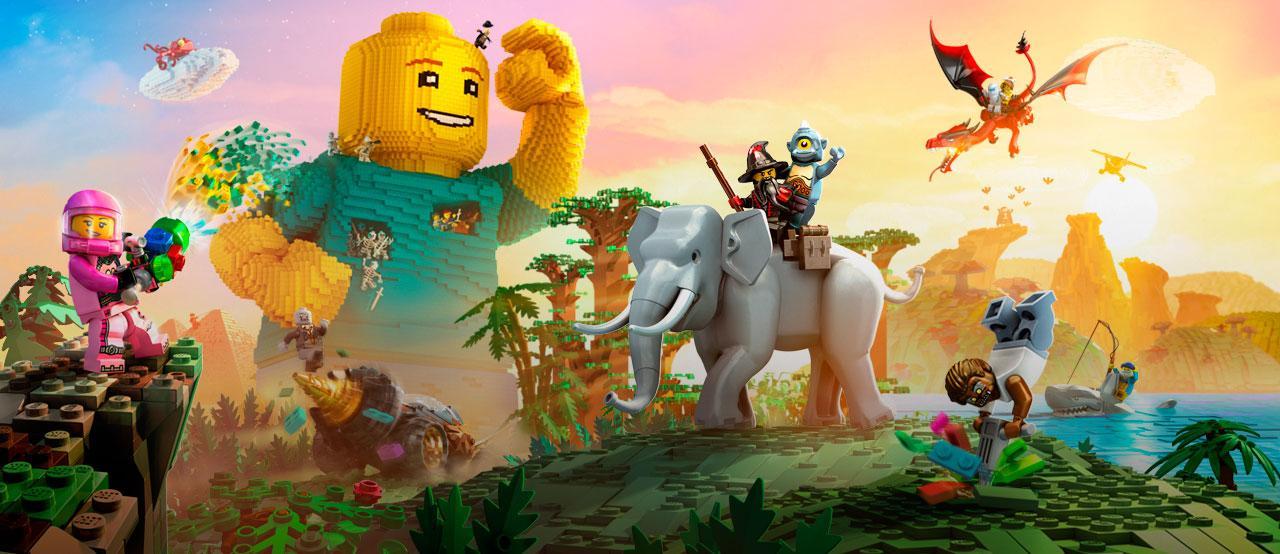
Hello, my name is Jim and I’m an addict. Yeah, I’m a grown-up… And still I play with toys. Legos are all the rage these days–even in the movies. So when Lego Worlds was recently released for the PS4, I jumped on it almost immediately. I’ve had the Early Release version for the PC on Steam for quite some time, but I only played it once in awhile. It was a really cool open world system, and you just dove in and started playing around with objects and characters, building and breaking things, etc., etc., much like Minecraft. I find many games a bit difficult to play on the PC unless I have my Steam controller optimally configured for that particular game, and in the case of Lego Worlds on Steam, I just wasn’t able to get it working to my liking, and often gave up trying to get it to work properly for me. So when the PS4 version was released, I knew that, finally, it must have a controller configuration good enough to work with on the PS4, so I gave it a shot.

I don’t know if the Steam version ever received the same treatment that the PS4 version now has, but there certainly wasn’t Tutorial levels and gameplay like there is on the PS4 version when I was playing it on Steam! My initial experience with the PS4 version was totally new, and it’s really interesting how it first teaches you the basics, giving you lessons along the way, and as you progress through the tutorial levels you learn more and more about how everything works, more items are given to you, and you basically (at least in my case) become addicted and want more and more eye candy, game candy, object builds, blocks, gold bricks… The tutorials end after 3 or 4 different worlds are “completed”, then you unlock the main “game” that in-turn unlocks everything else. The ultimate goal being to reach 100 Gold Bricks, which unlocks the ability to create NEW worlds of your very own. So this is all sort of a huge “training ground”, or a giant tutorial if you will, to prepare you for the open world creation freedom that is to come–which then, I imagine, works somewhat like Minecraft, where you can either start with a blank world, scarcely populated or completely blank, and build upon it whatever you will. Except that with THIS game, the tools at your disposal are far beyond anything I’ve ever seen in Minecraft!

But getting that far (100 Gold Bricks) is still on my horizon, so I can’t really say for sure how that part of the experience is yet (hence the “incomplete review” title). I’m at 71 Gold Bricks as of this writing, and climbing daily. The pace at which you gain bricks varies quite a bit, from what I’ve seen though. What happens after the tutorials is the ability for you to generate random worlds, then travel to them, explore and plunder them, all in an effort to gather everything you can from the world. This includes completing quests the characters on that world ask of you, finding chests filled with objects (including Gold Bricks), exploring, tackling troublemakers (who will come up to you and taunt you with the game piece they’re holding, then run from you as you try to tackle them to get the piece) and just plain trashing everything you can to gain studs (every Lego game’s currency). When you “Discover” an object in the game it gets added to your inventory, but you can’t actually “use” the object until you purchase it in the game using some studs. The value of each object in the game is pre-defined–for example it might cost 2,500 studs for a particular in-game vehicle–so if you pay that to unlock it, you can then deploy that vehicle anywhere, on any world, and use it in whatever way suits you. Or, perhaps an object is needed to complete a quest, and you have it… Use it and get rewarded with even more studs to use in the game. Added to all of this is the expansion of world sizes you can play in. You start out with just small worlds (as if that doesn’t overwhelm you enough), but after obtaining so many Gold Bricks you unlock Medium-sized worlds and everything is a lot bigger. Then, further on you unlock Large-sized worlds, and then, finally, Huge-sized worlds.

This very open-ended random-world generation makes things pretty interesting, and definitely a one-of-a-kind experience for everyone, and your own personality and tendencies come into play quite a bit. For example, there’s some really neat dungeons in the game, which are filled with traps, puzzles and monsters… Get through those successfully and you’re rewarded with many huge piles of studs! This is all really fun to play around with, but a smart kid just in a hurry to reach the end-game knows that with all of the tools available at that point in the game, one could simply pull out the landscaping tool and level the entire dungeon in one fell swoop.. or use to bazooka to blast right through the walls to the treasure. I considered this myself, briefly, before deciding to take the high road and experience the dungeon like I assume it was intended. Maybe later on I’ll come back and play around with leveling it, even if only to see how it was built and to possibly use some of it’s traps in the free world-building part of the game that I haven’t gotten to yet.

The game isn’t without it’s little quirks and bugs though. But I’d expect as much for a project this vast. There will no-doubt be updates to fix it up, I’m sure. One complaint I have might be a bug, but I’m not really sure. Right now it’s just an annoyance for me. Another family member found an awesome random world and wanted me to try it out. There’s an option to enter a random world “seed” on the main world selection screen, so I assumed this would allow me to enter the number he provided and I could then play that same world. So I entered the number, it appeared to show it in the mini map, but when I travel to the world, it’s a completely different random world! I can’t seem to get it to accept that exact number sequence, though it does allow me to see a preview of it. Very annoying. I can’t find a solution (or others even complaining about the same thing) on the web yet, so I think it’s just a bug that hasn’t been discussed yet.

So that’s the game, in a nutshell. I’ve been through the desert, the old west, a few very hot lava-filled planets, a few made of candy, some desert islands with interesting surprises, many caves containing buried treasure among other creepy things like spiders, scorpions and even zombies and swamp monsters, cloud cities and have even found many underwater treasures–including sunken shipwrecks, sharks, fish and even a few underwater cities. I can tell that the creators sure spent a lot of time either manually building whole areas brick by brick or wrote one heck of a procedural engine to generate worlds! It seems they are endless in their quantity, somehow. Like Minecraft, it boggles the mind. And, in the process, it feels like by the time I’m up to the 100 Gold Bricks needed I will have amassed hundreds of “discoveries” consisting of vehicles, characters, animals, insects, weapons, objects, and even whole “brick builds” (one-click mass-builds of large objects that assemble themselves before your eyes, instantly), and I will have learned quite a bit about the Lego world and what I am capable of as a “Master Builder”. I can see there’s also a lot of artistic skill needed as well, so for me things are going to take a lot longer to get right if I’m going to create any Lego Worlds of my very own. I’m sure going to want to, after spending this much time working through the entire game.

I’ll be sure to come back and complete this review or write a completely new one after I have completed the 100-Gold-Brick goal and am able to create entirely new worlds in the game. At that point I’m sure I’ll know even more about it and have much more to say. Now I’m going to head back into this Atlantis-looking underwater world I just found… I sure wish I could hold my breath for longer though… maybe I’ll find a or earn some scuba gear soon.

The Finish Line – Update added 3/24/2017

I made it. Last night, after sitting at 98 Gold Bricks for a day, I jumped in and made the push to 100 and made it. I saved the last 7 minutes of my gameplay if you’d like to watch it: https://youtu.be/NFaPjYGQ39c. As a subtext to the video: I had a trapped, frightened gingerbread person stuck on a rooftop. He/She had a gold brick, and if I could save them I would get my 100th brick. I had previously tamed several pigs, so they were following me around at this time. After some playing around with the landscape tool I managed to get the character to drop to the ground. As the gingerbread character pulled out its gold brick to throw it to me, he was attacked by my pigs and killed! NO BRICK FOR ME! Nazi Soup Pigs. But soon it happened again–another frightened gingerbread person in the same area… So I immediately took action, usied my scimitar, and sliced me up some tasty bacon to get that elusive last gold brick!

Obtaining 100 gold bricks gives you the rank of “Master Builder” and also unlocks the option to “Create custom worlds” in the game. So I played around with that option for the rest of the evening (and this morning before work) and I must say, the options are nice. I was a little disappointed at first when I couldn’t find an option to just start with a completely “clean slate” – just a blank, empty world, flat, with nothing in it – but I soon found that this was probably not an oversight, it was most likely done on purpose. You can, as they say, “create the Lego world of your dreams”, and if you desire a blank, flat world, well… go for it! It’s doable. Just do it.

Technically, you can’t actually “Create a new world”, as the voiceover announcer describes it at the end of obtaining 100 gold bricks (as you hear him say in my saved video). That’s deceiving, and I think it was actually a mistake. the game itself shows the option as “Create a custom world”. This is a bit more accurate, because you can only choose the individual Biomes, Animals, Characters, Vehicles and the world size you would like, then click the “create” button, and what it does is give you a world seed of that size, with those options set. It’s still a pre-defined world, with a seed you can share with any other Lego Worlds player. Your version of it might be just initially populated a little differently than anyone else’s, based on your preferences.

But this was a very interesting design choice for the game, as you’ll see. I set out, then, so create what I just mentioned above: A flat world, like a clean slate to start with–no animals, objects, or anything–sort of a complete beginning–so I know exactly what’s in that world, and everything in it I know came from me. The various tools available in the game are very fun to learn and use, so it’s not a problem at all. I chose the smallest world size, and just one “open prairie” biome, so the world would be as easy to flatten as possible, with the least number of objects to have to destroy and clean up. I used the “flatten” landscaping tool to level everything down (or up) to the same level, making it all flat. I guess I should say “am using”, as I’m still actively working on this world as I write this. My initial world came with many vehicles, animals and characters spread all over it, including a quest area or two, so I have plenty of work to do. As I level the landscape, animals on it will shift up or down to meet the ground and keep travelling on it, and I’ll select them and “remove” them to pop them out of existence. Sometimes I’ll run into a character or animal I haven’t discovered yet, requiring me to complete a quest first, before I can work with that particular animal or character. This is a fun side-objective, and it also provides you with more characters, objects and animals to use in the game. It even makes the dullness of simply flattening everything on the entire map much less so.

So create the Lego world of your dreams is fun, and there’s plenty to do along the way, so get busy. There are even plenty more gold bricks I can obtain as well as secret “Legendary” puzzle pieces which can be assembled to reveal even larger “Legendary Gold Bricks”, as well as many other things. It also seems like I will never have every single object, animal, character or vehicle in the game, so opening chests and completing quests can always earn me something new and unexpected along the way–especially with the possibility of downloadable content and add-ons that are sure to come later on. So I’m heading back in now, gotta keep flattening. Haylie wants an empty landscape to build her dream world on the next time she visits. This concludes my review.  I really like this game.

Playstation Now

Sony offers a new service for PS4 users called “Playstation Now”.  What it does is offer a free “streaming” library of classic PS3 games that you can run on your PS4, much like how Hulu and Netflix offer streaming movies.  You pay a monthly fee for full access, and in return you get open access to their entire library of Playstation Now titles (currently over 400 games).

Kevin and I are trying it out right now with a free 1-week trial.  So far, it seems to be pretty decent.  Another big benefit is that with this membership you also get the ability to play all of these games on a PC.  This doesn’t come without it’s own little hitches though–your PC must meet the minimum specs to run the Playstation Now software and you must connect a PS4 controller to your PC, either with a USB cable or with an adapter available for an additional fee from Sony.

I’ve been on a 7-day free trial for several days now, and I’ve tried most features as well as dozens of games.  The pricing is currently $19.99/month or $44.99 for 3 months (about $15/month).  Somehow the games really are “streamed” too.  This means they’re not installed on your PS4 or your PC, the data they use is streamed over the internet while you’re playing the game.  There may be some temporary storage on your local drive, but this appears to be removed once you exit the game you’re playing.  I have played over 40 games from Playstation Now so far, and have noticed no decrease in the free space on my PS4.

Gladly, each time you play a new game from the service, an icon for it is added to your PS4, just like any other installed game icon.  This means that in order to play that game again, you only need to open that icon and don’t have to re-open the Playstation Now application each time (unlike Hulu or Netflix).  I love this feature!  This way, I only see my favorite games on my PS4 and I can organize them any way I wish.  I chose not to mix these titles with my installed and purchased PS4 games, so I created a folder called “Playstation Now” and I put all of those games in that folder (along with an icon for Playstation Now itself, for easy access when I need it).

Sony has been pretty active with adding new games to the service, and I believe 20+ games were added just this past month.  This is quite a few more than Playstation Plus, which is currently offering 2 games per month for PS4, 2 games for PS3, and 2 games for PS Vita–their handheld game system.

When you start a game from Playstation Now, it downloads what it needs from the server, so naturally it takes a little longer to start a game.  But with today’s internet speeds, and Sony’s Internet speed requirements for subscribers to actually be able to use the service, this isn’t very long at all.  At least not for me.  I must admit, however, that I do have the top speed tier with Time Warner Cable, so I’m not sure how much of a difference that would actually make compared to other Internet Service Providers.

I do have a few concerns about the service at this point though:

  1. What will Sony do when they run out of old PS3 games to offer?  And when will this happen?  I’m not too sure developers are still developing games for the PS3, and if they are, it has to be much less than when it was Sony’s top gaming platform.
  2. One time, when trying to start a Playstation Now game, I was told that all of the servers were busy and I had to wait in a queue.  The wait time was currently 1-2 minutes.  After that wait time, the game launched.  As the service gets more and more popular, will this happen more and more and will wait times get longer and longer just to play?  Or will Sony reliably add more and more servers as needed to keep up with the volume?
  3. Did Sony choose to not allow backward compatibility on the PS4 just so they could make more money with this subscription service?  X-Box One has backward compatibility, though not 100%, but they’re improving it more all the time.  We still have our old PS3, and plan to keep it, now that we know we can’t play any of our old games on our PS4–unless we keep paying for Playstation Now–which offers many of those games, but still not all of them, though it does include many other good games we hadn’t ever played on PS3.  I guess I’d have to add up the possible cost of the entire Playstation Now library (which continues to grow all the time) and compare that with the monthly fee times how long we’ll potentially keep our PS4 to see which would save us the most money in the long run.  That’s a tough one.

Life is but a stream…So it seems like you’re actually running your game on a PS3 server somewhere at Sony, and your PS4 (or your PC) is simply serving up the screens it’s fed.  If this is the case, I don’t know how it can keep up without severe lag, but somehow it does…most of the time.  Several times during gameplay I have noticed the announced warning icon appearing in the corner of the screen.  They explain this icon each time a game is started, explaining that this means your internet connection quality (speed) has decreased, and you should save any progress you’ve made, if possible, just in case you lose your connection to the server.  Nearly every time this appeared, it disappeared again a short time later and I noticed little to no effect.  There may have been some frame loss resulting in a little jittering in image quality, but nothing else.  In one case, however, I’ve lost connection completely and the game exited on me.  A few minutes later I was able to re-launch it and pretty much picked up where I left off pretty easily.  Basically, before you subscribe, you definitely want to go with the free 1-week trial and make sure your own internet connection is reliable enough to play the games without issue.

Another key question I had with the service was whether it worked just like purchased game licenses work on the PS4.  This is where you can purchase one license for a game, install it on two PS4’s in your household, and two players (the players set a “primary” users on each other’s PS4’s) and both play that game together or separately.  I was hoping that this functionality also applied to Playstation Now, and I wasn’t disappointed.  It worked fine for Kevin and I, and we both played a long session of “ibb and obb” together (a simple, yet very interesting mind-bending puzzle game–something, it turns out, Kevin is actually better at than me!).

But so far, overall, I’m impressed.  I had no idea at all that you could stream games this way, using virtually no local hard drive space.  I had assumed this service would end up maxing out my hard drive and I’d be constantly swapping games out and installing others just to play everything.  The price seems a bit steep, but since the entire library of 400+ titles and growing weekly or monthly, I think it beats to 2-titles-per-month that Playstation Plus gives you…even though Plus gives you genuine PS4 titles that you then own a license for and have to install locally (but on the other hand, you own that license to the game, even if you stop subscribing to Playstation Plus, unlike Playstation Now where you lose access to its entire library if you stop subscribing.  At $15 per month (paying 3 months at a time) it would work for both Kevin and I on one account, so we could split the cost.  That brings it down to just $7.50 per month for each of us, which isn’t bad, in my opinion.

That’s about it.  Now let me go play some Red Dead Redemption, which I see was just added to the PSNow library…

PS4

I recently got a PS4.  The world of console gaming has changed quite a bit, so I figured it was about time I started catching up…at least for a while.  I’m sure I’ll soon be behind the times again and this brand-new console will be considered “old”, but until then, I’m going to enjoy it!

One of the big changes with today’s consoles is digital versions of games.  Every game can now be purchased as digital, which means you no longer need a CD or–God forbid–a cartridge–to play a game.  When you purchase a digital game, you simply download and install it directly on your console’s hard drive, and can play it whenever you want.  This also means you can install it on multiple consoles, and as long as you’re a user on that console, you can play it there.

Today’s games can sometimes be ENORMOUS, however, so the digital versions can consume a lot of hard drive real estate quickly.  Even most disc-based versions of today’s games require installing to the hard drive anyway though, due to the speed advantage it provides when loading and playing the games, so there isn’t even much benefit gained by having a disc-based game over a digital version.  If fact, these days I find it much less convenient to have to insert a disc to play a particular game rather than just choosing it from a menu to play–just like today’s digital movies.  I haven’t played a physical DVD or Blu-Ray disc in AGES, it seems like!  But that convenience doesn’t come without a price: SPACE…the final frontier… Having all digital games will quickly consume all of the hard drive space you have on your console, requiring you to either upgrade to a larger-capacity hard drive or you’ll have to remove older games you aren’t currently playing to make room for the new ones you want to play.

Luckily, right now hard drive prices are ridiculously cheap compared to what they were in the past and the amount of space they provide.  It would cost me less than $100 right now to double the size of my PS4’s hard drive, and eventually I’ll probably do that.  Right now I’m at about 50% full on my 1TB drive.

Sony also makes the process as painless as possible, only requiring the removal of one screw to pull the hard drive out and replace it.  Re-installing all of your data and games is another story.  You can’t simply copy your installed games from your old hard drive, even if you install it in a drive enclosure and connect it to your PS4 via USB.  Sony doesn’t allow this.  Only your game save data and settings can be backed up and restored from USB media.  All of your games and addons have to be re-installed from the Playstation Store…or they can be transferred over your network from another PS4 system.  The latter is the easiest option, if you have another PS4 on your network.  The data and game transfer is blazingly fast–much much more so than re-downloading everything from the Playstation store–so if this is an option for you, it’s definitely recommended over the re-downloading option.  Remember when using this option, however, that anything that you haven’t purchased yourself–like any games or addons that were purchased by another user–will appear as “locked” on your PS4.  You will have to either purchase that content for yourself in order to use it, or that user can still use that game or addon when they are using your PS4.  You’re also free to uninstall or delete any locked content on your PS4 at any time as well.

There is one odd way that two PS4 users can share purchased content, but it only works with exactly two people–and you better trust that person very much too, because you’d be opening up your entire account access to them.  You just have to activate the OTHER PS4 (the one the other person uses) as your PRIMARY PS4, and activate YOUR PS4 as the other user’s primary PS4.  Then you just use your account on your PS4, like normal, and since it’s his primary PS4, his purchased content is playable by all users on your console and you can play your own purchased content on it as well.  And because his PS4 is set as YOUR primary PS4, he can play his content on his PS4 as well as yours.  It works great.  But like I said, just make sure you trust the other user completely, because they have full access to your account and content!

X-Box 360 Upgraded

My X-Box 360 is now upgraded.  I was shocked at the simplicity.  Not even any tools needed!  The hard drive on the X-Box 360 is actually attached to the left side of the console (at least on MY model it is–I think there have been one or two new versions released since mine though).  You just push in a button there while pulling on the drive and it disconnects and pops off.  No wires, no muss, no fuss.  Connect the new drive the exact opposite and you’re half done!  The transfer cable then attaches to the old drive, which I just disconnected, and provides a USB connection that plugs into the back of the X-Box.

After attaching the new drive and connecting the old one via USB, I powered up the X-Box and looked around. My profiles were still there, but obviously no content.  Without the “transfer disc” that I had seen on the Interwebs, I was a little concerned about the process.  So I went to Settings >> Storage, and there I found the options I was looking for.  The drive showed that it was Internal and empty, and the options on it included “Transfer data”.  I chose the “transfer data TO this drive” option, and was then able to select a source device, which was the external drive, then I was given the list of item types on the source drive (Profiles, Demos, Games, Videos, etc.) and asked which ones I wanted to transfer.  I chose everything, then deselected Demos and started the process.

With a 120GB drive, it took about an hour to reach 100%.  Once it finished, I powered off (but wasn’t prompted to), disconnected the old drive connected to the rear USB jack, and then powered up the X-Box.  Ah, quietness!  The system is much quieter now, though still a little noisier than I thought.  I think the DVD drive mechanism is just loud when it checks for a disc.  It still works fine though, so I’m not concerned.  The system came up fine and all games and content looks great, installed, and I still have over 390GB free–lots of breathing room with everything I currently own for the console already installed.  I just wonder if ALL of Microsoft’s consoles are this easily upgradeable, or if I just got lucky with this one.

I’m not old, I’m “classic”

xbox-360-elite-wcontrollerWe recently dug out our old X-Box 360.  We hadn’t used it in a few years, though it was still hooked up to a TV.  Again, like our PS3, the hard drive had gotten full, so things started getting difficult, and it ended up just going unused as we moved on to other things.  I considered selling the console, and even went as far as to gather up all of the info about it, including the 26 games for it that we have on discs, and I posted it on our Slack Team’s site.

But after a day with no response–during which time Kevin discovered about 11 or 12 more games on discs that I had missed–I also found that I have about 70 more games that I purchased as digital downloads from X-Box Live that were on the hard drive!  I should have considered this before posting the ad I guess.

So I took the X-Box 360 and moved it out to the living room and set it up again so I could thoroughly go through the system and catalog its entire contents.  After doing this, and actually finding many “lost treasures” in the form of classic games from my youth, I decided to promptly pull the ad and keep the X-Box 360.  The 70+ digital games alone would be quite a chunk of cash (at least for me) to throw away, let alone the 30+ disc-based games that we had purchased.

I loaded up a few of my classic favorites yesterday, just to try them out, and quickly found myself enjoying them all over again, not wanting to close them until finishing “just one more level.”  The hard drive did start sounding pretty loud after the system was on awhile though.  It’s the system’s original 120GB hard drive.  It’s pretty maxed out with everything I purchased back in the day, leaving 2.2GB of free space on it… barely enough to hold another decent game.   And of course, you know me… I immediately jumped on the interwebs and found a replacement internal hard drive.  The largest internal drive I could find, that matched the older X-Box 360 model I have, was 500GB for $40.  So I grabbed it.  In a few days I should be able to upgrade and then have plenty of breathing room to work with on my “refurbished” X-Box 360.

Just like with the PS3, I justify it by stressing how cheap the games, parts and accessories are for these old systems… And they play all the good old classic games I love.  I hope the 360, as well as the PS3, last for many more years.  I’ll probably try to keep my youth alive as long as possible!  Let the old-times roll!

PS3

Yeah, sure, the PS3 is pretty old now.  But I’d rather like to think of it as a “mature” console.  Not unlike myself, it is “aged”.  This also makes it–and its games and accessories–a lot more affordable, which is a huge plus, in my book.  It also has a long history, and has gone through 3 versions.  I look back at my purchase history and feel good remembering those classic old games and how much I enjoyed playing them.  All 800+ purchases.  Many of them, in fact, are console versions of even older “classic” arcade games, which bring back even more memories of my past.

One of my all-time favorite games was one of the first games I purchased for the PS3–Joust.  This was an arcade video game where you ride an ostrich and fly around jousting buzzards (and another ostrich if two people play it).  If you fly into a buzzard or the other player and your sword is higher than theirs, you win the joust and kill your opponent.  Kill all of the other players on the screen and you complete the level and advance to the next–harder–level.

I purchased this game in 2006–about 10 years ago, as a digital version.  This means there’s no physical disc or cartridge, you just download the game to your console, install, and play it.  It wasn’t until just recently that I became concerned about this method of game ownership.  First of all, Joust is no longer offered in the Playstation Store for purchase, so I can’t look it up there and re-download it, like I thought I could.  I imagine there are probably several classic games that I purchased back then that are no longer in the Playstation Store.

The reason for my concern is because I decided, earlier this week, to try to get back into playing some of my favorite games, just to relax a bit, and possibly play a little during my walks on my treadmill, but I quickly discovered that the hard drive on my PS3 (320GB) is completely full!  I had cleaned it up some time ago, removing all videos, music and photos, in order to free up enough space to install GTA 5, another great game I play occasionally.  When I say “play” referring to GTA 5, I mean just driving around freely throughout the city and county in the game, driving over people, destroying properly, jumping out and chasing down people to punch them out, and basically wreaking havoc  until the police come and try to stop me.  I don’t really play many missions, as you’re supposed to do in the game, I just goof around to see how much trouble I can get into.  But I digress.  Back to my full hard drive:  As I said, I cleaned up the drive recently, removing nearly everything I could that wouldn’t effect gameplay, and after installing GTA 5, it’s pretty much full to capacity again.

The PS3 has a backup feature, allowing you to back up all of your data and transfer it to another PS3 (or the same PS3 if you’re doing something like replacing the hard drive).  So I tried this, using a 64GB thumb drive I have.  So I started this process, and after several minutes of thinking, the PS3 told me it needed about a drive with about 200GB more storage space!  Agh!  I don’t have a flash drive or external hard drive available with that much space free.  I even tried one external drive that I store TV Shows on for use with my Plex media server, but that drive is formatted as NTFS, and the PS3 requires a FAT32-formatted drive in order to use it.  I know, that’s all Greek to the non-geeks reading this, so let’s just say “that drive won’t work on the PS3”.  My PS3 currently has a 300GB drive, which was pretty huge back in it’s time, but these days it’s hardly enough.

So there I was without a backup solution, and I had a brand new, 1.5TB drive (the largest hard drive the PS3 will allow) waiting to be installed in my PS3.  The way I saw it, at that point I didn’t have much to lose moving forward and installing the new drive.  I found out that I can access my entire purchase history and I can re-download everything I’ve purchased in the past, so I figured it would just require re-downloading everything I want to play.  I would lose my old game saves from way back when, but that’s no biggie for me.  Working through all of the levels in all the good ole games again just adds to the fun! I only had a 320GB drive before, so even if I install everything I had before, I should still have over 1 TB (1000 GB) of the new 1.5TB drive free when I’m done.

So I installed the drive, which was a pretty simple operation, and the PS3 simply prompted me for the latest PS3 update data, which I downloaded to a small flash drive and inserted, then it installed this and formatted the new drive.  All went well, and then I installed a few old games without issue.  They seem really tiny these days, especially on today’s huge-capacity drives!  Over time I’ll be installing a lot more of my old purchases, as I get around to more and more of my old games, and now there’s tons of space for some new ones, if I want them.  It’s nice to have some breathing room back, and it’s such a relief that Sony allows a simple method to re-download all of one’s old purchased content!  They’re earned back a little more of my trust, having lost a lot of it with their support of Cinavia–a copy-protection method that detects copied commerical media and prevents the PS3 from playing or streaming copied DVDs, Blu-Rays, and streamed movies that aren’t originals.  In today’s world, if you don’t keep a backup of something–especially something you purchased electronically, you’re always at risk of losing it due to everyday use, damage, or disaster, so backup copies are critical.  And Ciavia prevents users from being able to use those backups–basically resulting in the PS3 user being assumed to be a pirate!  This also results in the PS3 being rather crippled as a media center, in my opinion.  Whether Cinavia is still built into the PS3 these days, I’m not sure, but I think it’s still there.  I’ll find out soon, as I just installed the Plex app and will be connecting it to my Plex server soon.  Plex is a media server I use to stream all of our movies, tv shows and music to all of our devices.  If Cinavia effects Plex playback, I’ll have to uninstall it and just stick with using it through our Roku boxes as we always have.  That would be sad though, as using it through the PS3 controller or the PS3 Remote looks like it would be fun.

I also discovered, after accepting to two-week free trial of Playstation Plus, that they now offer online storage to Plus users for storing all of their game-save data!  I’m pretty sure that gives me a window of two weeks where I can swap back to my old, full drive, save all my game-save data to my online storage, and then swap back to the new drive and still access all of my game-save data (and hopefully save it back to my new drive easily) so I don’t have to keep paying for Playstation Plus after my two-week trial.  We’ll see how this goes.

Lastly, I’m really liking the fact that all of the PS3 games, accessories, and online content is, by far, a lot cheaper than just about everything for the PS4 and X-Box One!  And since I haven’t been involved with it for a few years, everything I’m seeing is new to me, even though all this stuff is probably old to everyone else.

New Toy

The Moto 360 smartwatch recently dropped another $100, which puts it at $149 now. We paid $300 for Kevin’s at Christmastime, so it’s actually a decent price right now, considering its features. I also had a $20 coupon for Best Buy, which was close to expiring, so for $130, I couldn’t resist.

Let’s get the worst thing out of the way right away: The battery life SUCKS. Just getting in an 8-hour shift at work without the watch dying is rare. It does only take 1 hour to fully charge from dead though, even using any wireless Qi charger, but it’s still a hassle. If it could somehow charge within a 2-foot range while still attached to my wrist, now THAT would be awesome… But I usually have to take it off and set it on top of my Qi pad for an hour to charge it up at work. Hey, at least it’s wireless!

The only other thing wrong with this watch is the “flat tire”. This is a small flat section at the bottom of the otherwise-perfectly-circular display. I have heard that this area is there to hold various sensors that the watch uses, so it’s necessary, but does tend to take away from the “perfect circle” display somewhat, and also hides useful information from watchfaces that take advantage of this area for displaying information. Several round-display smartwatches have since been released without this “flat tire” though, so one wonders whether they found a workaround for whatever sensors Motorola needed to put in that spot. Those watches currently cost a lot more than the Moto 360 right now though, so it’s a trade-off. Save $150, but get a flat tire…? I’ll take it!

But aside from those two things, I love the watch! It uses Android Wear, which is the universal software connection between pretty much every smartwatch and Android. This apparently opens up options for just about everything you could imagine, depending on what a developer wants to use it for. First, and foremost, is telling time. Yes, it tells time like a REAL watch. And if that’s all you want it to do, you might just be able to get decent battery life out of it as well! You can simply turn off all notifications and other features, find a simple watchface with only the most basic of animations (like just moving hands on an analog watchface) and the battery will probably last quite some time. I might have to try that some time, just to test this theory. But right now, I’m still playing…too many knobs and dials to try out…gotta play, gotta tinker.

Every option for telling time is available, even if you don’t see it in whatever watchface developer’s interface or app you’re using. Developers will only provide the features THEY want to, make their interface either easy to use or very difficult, and/or even make you pay for their watchface and/or design interface to make your own watchface. So, obviously, your experience with the watch may vary greatly. For myself, I like to try out everything, then I’ll eventually settle on a few apps or watchfaces I like the most and just use those. But then there’s always new stuff coming out, so I try those as well, hoping to find better things along the way. Being a geek, this is normal for me though.

Basic interfaces allow options for time, date, battery levels for the watch AND your phone, weather, etc., and some developers will also use nice animations, include calendar events, etc., but at the expense of battery life. Apps are another option altogether. Certain apps can be “installed” on the watch, though I’m pretty sure these are just tiny “stubs” or “mini versions” of actual applications that are primarily installed on your Android device, then simply feed data to your watch as needed. If an app installed on your android device is Android Wear-compatible, it is automatically installed on your watch and appears in the Apps list when you swipe right-to-left on the watch. One of these that showed up for me, surprisingly, Ingress! This is the MMO GPS game played worldwide that I play regularly (Resistance – Blue team). On the watch, when active, it alerts me to when portals are in range, and even allows me to hack the portals from my watch! This is neat, but after some use I find that it’s pretty limited and pretty much just a novelty. Your options are pretty limited, and–just as Ingress does on your phone–it’s a real battery juice sucker! Try hacking on your watch for an hour and you’re watch is DEAD, believe me!

Basically, the experience you have with the watch and how much you like it is going to come down to the quality of the developers and the apps and options they provide. For example, there’s an amazing app available called “Tip Calculator” for calculating restaurant tips, which you would think requires a calculator-type interface with all the number keys. This app manages to work flawlessly with only the slightest learning curve, has no “keyboard” at all, but only a few numbers (which are controls as well) in its center and a circular dial around the outside circle. It works great, doing exactly what it’s supposed to very quickly for you. It’s perfect for a round watchface. I hope more developers take a lesson from this one. The design is awesome, both in appearance and functionality!

There’s certainly no shortage of watchfaces for Android Wear. There are literally thousands out there to choose from, or you can just use one of the hundreds of different interfaces and design your own! There are so many good ones that I can’t even settle on just one and keep it that way, like Kevin does with his “Chicago Bears” themed watchface. I have a few different “Google Fit” watchfaces that show me my daily stats, including a constant view of my heart rate, my steps done today, and calories burned etc., and both my watch’s & phone’s battery levels as well as and “ambient” display that shows today’s weather forecast and temperature trend through the day. Another of my favorites is a “Military” watchface with no less than 6 different screens of details to flip between, and instant color-changing of them with a simple button push.

Basically, I’m happy with it. I consider it a geek toy, and it’s perfect for that. It tickles my wrist whenever I get any type of message, e-mail or text, and I can preview a bit of it or even read the entire message most of the time right on the watch. It helps me keep my phone in my pocket more often so I’m less distracted, and the automatic tracking of my steps and heart rate is just a health-monitoring bonus I could use. During my walks it constantly shows me my walking details and displays the music I’m listening to on my headset while I’m walking. And right now it’s analyzing my daily routine and it’s supposed to come up with a plan to help me stay (or in my case, “get”) fit based on my schedule. It should be interesting seeing how it progresses. It says it’ll take a couple weeks of gathering data.

Sargeant Update (less important than a General Update…right, Captain Obvious?)

Well, Rickochet is out now, so we’ve been working on our basement a bit. I guess it’s what they call a “partially finished” basement… We have carpeting down, and have one room down there paneled, but that’s about it–the rest is your basic basement, but it’s clean and dry, so we’re fixing things up a bit. We have a carpeting install coming for the one room down there, and once that’s in, we’ll be setting that up as Sandy’s “She Shed” (that’s the equivalent of a lady’s “Man Cave”). The rest of the basement will be for recreation, laundry, etc. We also gained some much-needed garage space, so we have some room to work on getting THAT cleaned up. It’s been waiting, with everything still in boxes, since we moved 3 years ago!

Matt helped us out recently by trimming the branches on our backyard tree. I picked up a nice, lightweight electric chainsaw from Menards, along with a tall ladder, and he able to get to nearly all of the branches we wanted removed–especially those overhanging our roof and one in the front yard that had our flag wrapped around it! The flag (still attached to our flagpole) got pretty damaged, but I was able to remove the branch from it after Matt cut the branch from the tree. It’s a little shredded on the end, but it’s flying free again, in time for the upcoming holidays. Thanks, Matt!!

We sold our big Ford Edge and switched to a Ford Focus Titanium instead. It’s a bit smaller and isn’t 4-wheel-drive, but we were able to cut our payments to less than half–even with the Titanium model, which has ALL the goodies on it–so it helps us a lot. The only regret I can see us having might come in the winter–a bigger, stronger 4WD vehicle can be a blessing in certain situations. But we’re well aware of that ahead of time, so we’ll work around it as best as we can and tough through the Wisconsin winters with it. At least it has remote start and a rear-view camera, which the Edge didn’t have.

Sandy, Ty, Kevin and I went to see Jurassic World yesterday. Awesome movie, they really pulled it off with StarLord as the main character. Chris Pratt seems to be great in everything these days. And then there was Vincent D’Onofrio, who played Private Pyle in Full Metal Jacket… He played a military guy (go figure) looking to use genetically-engineered animals on the battlefield. I half-expected Lee Ermey (his unforgettable drill sergeant from Full Metal Jacket) to make a cameo appearance, like Stan Lee always does in the Marvel movies. It was great though–not even any really slow points in the movie either… Every time things started to slow down, BAM! They hit you with something else and off it went again. I think they were able to successfully pull off this one, using the same old island group “Isla Sorna”, etc., and they’ll probably do some record-breaking numbers. I just hope they can keep it up with the inevitable sequels. I have already heard that Chris Pratt is on board for more of them. We’ll see what happens.

I got a new phone last week – the Samsung Galaxy S6. 64GB of memory & a 8-core processor, but it’s sealed–no SD cards and no battery changes. So far it’s nice–amazing speed and features. The only downside is the battery time. I get about 10 hours out of it, before I need to recharge. I have to keep my brick pretty handy–but my brick is huge, so I can actually recharge my phone completely about 3 or 4 times from a single charge of my brick, so that’s not so bad. Having 64GB of internal memory–which is a first for me–eliminates a long-time problem I’ve had though: Juggling all of my apps, music and data files. Now that it’s all in one place, I don’t have to think about where things are or specially-configure specific apps (like DSub for my music) so they put their files in the proper locations. Everything just works. The camera is awesome too–supposedly the best smartphone camera out there today. 16 megapixel photos, animated GIFs, as well as many other modes, and it’ll even record 4K video. I already recorded a couple to test it out. I’ll have to watch them at Matt’s house, as he’s the only one I know with a 4K TV right now. And for those geeks who are even more curious–yes, after the usual 1-day of use, I again dumped the stock launcher and installed Nova Prime. No stock launcher ever comes close to the features and ease of use it provides!

Photomosaic of Socks

SocksPosterI created a 3-foot posted of Socks for the wall above my desk using 10,000+ photos I had on my PC as the palette.  I created it with Andrea Modaic Professional, then loaded the final image into CorelDraw and printed it as a 3-foot poster on tiled sheets of standard 8.5″ x 11″ paper.  The hardest part was using scissors to trim the proper edges, and align and tape them, but it was fun.  If you’d like to see the actual poster, up close, here’s the actual image, full size.   I gave it the option to NOT re-use any images (but some are burst shots, to they LOOK very similar) and gave it permission to horizontally flip images, but not to rotate them.  And if you’re interested in the rest of the geeky details, here they are:  Socks Mosaic Details


New photo albums added

Ok, getting caught up over my 5-day weekend!  Here’s some new photo albums–including THIS Thanksgiving!

Civil War Museum – Sandy’s photos from her recent visit with a client.

Halloween 2014

Haylie’s 5th Birthday

Snow Sculpting Championships 2014 – from nearly a year ago–this year’s is coming up at the end of January!  I’ll be there.

Thanksgiving 2013

Thanksgiving 2014

That should about catch me up.  Keep in mind a few of those are pretty raw.  Since I dumped everything, very quickly, I didn’t pick and choose the best photos.  Yet.  I’ll get to it, I just need more time.  So for now, a few of those albums contain hundreds of photos.  Consider this a “behind the scenes” preview.  Many of those will disappear soon as I curate them.  Enjoy!

Moved to Google Photos

I have recently moved all of my 29,000+ public photos from Flickr to Google Photos.  Google has been making a lot of progress with their photo services recently, including integrating Picasa into Google Photos.  With everything they now offer, and how easy everything just is to use, compared to Flickr and the difficulties I have had trying to stick with them, I decided to move everything.

I made the final decision a couple weeks ago, when I found this site: http://www.flickrtoplus.com/.  It allows you to simply login to Flickr, then to G+, and it lists your albums and you just choose the ones you want to migrate from Flickr to Plus.  It couldn’t have been easier.  I tried a few albums at first, wondering how they can afford to devote all the processing required to to this for everyone for absolutely nothing–no ads on the site, nothing, it simply works.  After a few albums came through just fine, I did a dozen more, then queued up dozens more after that, then the hundreds more after that.  Within a week everything was done!

It uses your “Google Drive” space for storage and allows you to keep your photos at their original size & quality–a huge factor in my decision.  I recently realized that Google will scale down large photos you upload to G+, so that was disappointing, but after looking into it, using Picasa I can upload photos at their original resolution without it re-sizing them, and the flickrtoplus site also gives me the option to migrate them in original size or “large” size, which is smaller.  I chose “original” for everything I migrated, and I always upload my photos full-size.

With how simple Google’s search features work, it’s just so easy to find any photo or album I need now.  And Google Photos even looks simpler than Flickr’s interface, even though there are many more features you don’t see, that Flickr isn’t capable of at all.  There is one thing missing from Google Photos, however, that I liked in Flickr–and that’s “Collections”.  Flickr called its photo albums “Sets” and “Collections” were groups of Sets you could group together, like “Birthdays”, “Vacations”, etc. to keep things more organized.   Google Photos doesn’t offer an option for this, so all of my albums (402 of them right now, to be exact) are shown on one page.  I thought this would make things difficult to locate, but since Google’s search is so fast–and page searching is also so fast (using CTRL-F) I can find anything I need in my albums very quickly.

As far as price and space, it does cost a little more to go with Google than Flickr.  I was paying a flat $24.99 a year for unlimited space on Flickr, which is a really good price, especially for unlimited photos at full-size.  On Google, there’s a limit depending on the plan you choose: $4.99/month for 100GB, $9.99 for 200GB, $19.99 for 400GB, etc.  But–and this is a BIG BUT for me–this space is combined with Gmail, Google Drive, and Photos.  Right now I’m using just over 60GB for everything with all of my 29,000+ photos and everything else, so I could get by with the $4.99 a month, but I’m on the 200GB plan instead, just to have some breathing room for future photos and all of my documents, which are backed up on Google Drive, and my e-mail.  So, for me, that’s $120 per year now, instead of $24.99, but it’s more than just my photos, and I just trust Google more that Flickr.

So that’s that.  I’ve changed the “Photos” link on my site to go to my Google Photos Albums now instead of Flickr, and some time in December my Flickr account will downgrade to a free account.  This will make only 200 of my latest photos available there, the rest will be hidden.  I’ll probably delete my Flickr account at that time anyway, just to avoid people adding comments to the 200 latest photos they can see.

Connor

Connor Matthew Krumm

Ok, I’ve started a photo section for Connor Krumm, Matt and Anna’s baby.  This will be the first time I’ve started an album before someone is born, so I guess this one is at age zero.  I figured I might as well start now, since we already have a stack of photos (sort of) that Matt and Anna have shared with us, and now that they’re accumulating I wanted to make sure they didn’t get misplaced or lost.  So here we go, Connor’s place in the cloud.  The set will include photos from both inside and outside of the womb.  His expected arrival date is December 21st, 2013.

Camera & Eye-Fi Review – Sony DSC-HX20V with Eye-Fi Pro X2 16GB

I got this camera for my 50th birthday this month. So far, it’s nothing short of great. And after reading about the Eye-Fi card, and how it works, I immediately ordered one to use with the new camera. The 18.2 MP photos are great, and the 20x (40x digital) really is nice too. I’ve been using the “i+ Superior Auto” mode, which is new for me. What it does is pretty nice: When you take a picture in this mode, depending on the lighting and the image contents, you might hear multiple clicks as the shutter snaps multiple times using various settings. Then it combines all of the images and blends them automatically into one photo, much like HDR. This allows you to take excellent low-light photos that are still crisp and clear with little or no graininess in them. The camera also has built-in GPS tagging (and logging, for recording your journey on a map!) It takes the camera a couple minutes to grab the GPS signal once you turn it on, but from that point on it works great.

Another excellent feature is “iSweep Panorama” mode. This mode allows you to simply click the shutter button and sweep the camera from left to right in one clean motion, either slow or fast. Once you’ve rotated it 180 degrees, your panorama is completed and it displays as a nice, long photo on the screen, at a resolution of 4912×1080 (5mp) in STD mode, 7152×1080 (7.7mp) in WIDE mode, or a whopping 10480×4096 (42.9mp) in HR mode! This is tons better than many other panorama methods I’ve seen cameras (and apps) use, involving stitching of multiple separate photos together, or doing virtually the same thing, but by having you click for each photo, then overlapping them in-camera as you rotate to the next spot, line it up, and click again.

The camera also shoots very nice, full 1080p video, while using image stabilization (optional) and optional zooming, so it’s great for home movie-making as well. It will also shoot 3D photos and 3D panoramas as well as 3D multi-angle images viewable in-camera and on 3D TVs.

The final kicker, which makes this pretty much my “dream” camera, is the addition of a Eye-Fi Pro X2 16GB SDHC card! This is a memory card, used just like a standard SDHC memory card–with one major difference: It has built-in Wifi! When configured (initially, on a PC, with the included SDHC card reader), it will automatically sync all of your photos and videos–as you take them–with your home PC, laptop, or your Android or iPhone! And it can optionally auto-upload to your favorite photo-sharing service like Facebook, Flickr, Picasa, and many others! I will never have to worry about losing any of my photos, because they’re automatically backed up–both on my PC and in my Flickr account in the cloud!

Once I take a photo or two, after about a minute (as long as I keep the camera’s power on) the photos start streaming into my Android phone. It will also optionally GPS-tag the photos from your cell phone. I actually set this option, even though the camera has GPS, because I like to turn the camera on and snap photos quickly, and sometimes I’m done shooting before the GPS ever gets a lock. So with this option on, the GPS from my phone (which is on all the time) is used to tag the photos instead, and it’s fairly accurate all of the time. Once the photos are uploaded to my phone, my phone then uploads them to my preferred backup destination–which is Flickr. You can choose to make them automatically public or private, or only viewable by certain people. I have mine set to private, then later on I can sort through them on Flickr and publish those that I want to share, and delete or keep the rest as I want. This will be great for vacations! I can setup the photo album ahead of time, make it public, then snap all the photos as we travel and everyone gets a live photo feed of our trip! Hopefully it’ll work out much better than EveryTrail, which has pretty much been a flop for our vacations thus far. I can understand having some “dead spots” in very rural places at times, when crossing the country, but for it to just stop working completely when we take just a few photos and never pick up again until we’re at our destination two days later, is simply unacceptable. That’s EveryTrail though, and has nothing to do with Eye-Fi or the camera.

I tried the camera today for a new Ingress Portal Submission, and it worked great. Took a minute to get to my phone, and once the photo was there, I shared it to NIA Super-Ops, gave it a title, and submitted the new portal. The Eye-Fi Pro X2 Android app also has the ability to simply auto-upload photos taken with just your cell phone camera as well, so all of the photos taken with just my cell phone are also automatically uploaded to Flickr and/or my PC just as the camera’s photos are. This is a great bonus because it fully backs up EVERY photo I take, not just those taken with the camera containing the Eye-Fi card.

The only issue I have with using the Eye-Fi card is how I have to leave the camera power on after shooting photos. I have the habit of powering it off immediately after I’m done to save battery. When I do this, it can’t establish a connection to my phone and send the photos to it. Granted it does transfer the photos just fine the next time the power is turned on again, but that makes backups a little less instant, making my photos a little more vulnerable. Once I leave the camera on and the photos finish transferring to the phone, then the camera power shuts itself off automatically. Though, how an Eye-Fi card (which can be used in ANY camera) can control THIS camera like this, I have no idea. Don’t question the magic Jim, just go with it…

The big 5-0, Ingress again, X-Box, and Spam

OMG! I turn 50 this weekend! The horror!! I just wish it was past already. My wife’s got something planned and she keeps insisting it’s nothing big, just a small get-together at the house… I sure hope that’s accurate. I hate all the “Over The Hill” gifts and parties I’ve seen others have over the years. It’s just another day, take it easy.

I’ve been obsessed with Ingress lately (see my previous post if you don’t know what Ingress is). I finally made L8 – the highest level in the game, and it only took 4 months! Now I am changing my focus from leveling up to helping other teammates level up–primarily Kevin, Tyler, Matt, and Eric. Having a nice group of L8’s in our area will give the Resistance some serious power in the game. It’s fun, very addicting, and I’ve met a lot of nice people who play the game.

Microsoft introduced their new X-Box recently–The X-Box One.  Really? One?  This is Three, right?  I don’t know about you, but when I refer to the ORIGINAL X-Box, I call it the X-Box One.  Hello confusion.  Are we going to get one? Probably.  Just like the PS4.  Eventually.  Everything changes.  Gotta keep up.

Finally, I managed to find a excellent plugin for my website that totally eliminates the spam I’ve been getting! This is exciting for me, because it was such a pain to keep cleaning up hundreds (sometimes thousands!) of spam messages each month. Now I can focus on other things more… like hacking portals, or posting a little more often…