Tag Archives: photos

Connor

Connor Matthew Krumm

Ok, I’ve started a photo section for Connor Krumm, Matt and Anna’s baby.  This will be the first time I’ve started an album before someone is born, so I guess this one is at age zero.  I figured I might as well start now, since we already have a stack of photos (sort of) that Matt and Anna have shared with us, and now that they’re accumulating I wanted to make sure they didn’t get misplaced or lost.  So here we go, Connor’s place in the cloud.  The set will include photos from both inside and outside of the womb.  His expected arrival date is December 21st, 2013.

Milwaukee Art Museum

Milwaukee Art MuseumWe had a very busy weekend! Saturday, Kevin and I went to the “Blues BBQ” event that some of our fellow Ingress Resistance members organized. It was an all-day event that started with a nice potluck BBQ lunch in a park. We had some great food, chatted, and prepared for the afternoon’s events, which included an organized attack and takeover of a large college portal farm, then a planned split-up to various other farms to send a message to the Enlightened. I’m going to leave out most of the details of this mission, because I wouldn’t want to reveal any intel that the Resistance might want to keep under wraps. Kevin and I carpooled with another Resistance member to the college, we performed our portion of the attack and takeover, then quickly brought the college up as a blue L8 farm, then farmed and burned out as many portals as we could before the Enlightened started showing up to flip it back to their side. Kevin and I then got dropped off at the park we had the BBQ at, and grabbed our own car to head to our assigned farm. Kevin and I then had a blast plowing through several large clusters of smog-green-covered areas, flipped them, and made them all a perty blue color. Kevin gained a lot of AP, and he’s very close to L8 now, with just 1 bar left to go. We just need to find and flip one or two more green farms and that should do it. Either that, or if the 25-30 new portals I submitted recently come online soon, that might do it as well.

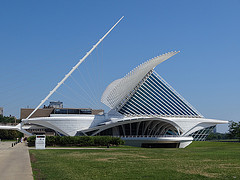
Sunday we spent the day at the Milwaukee Art Museum. After visiting there a couple times on Milwaukee portal runs, Kevin–being a big art “aficionado”–kept asking if we could go sometime for real–without the portals. So we planned it and went. We ended up getting a family membership because there’s just so much to see there, we’ll definitely be going several more times over the next year. There was a really neat “Art in Animation” exhibit there with a lot of interactive activities for the kids, and Kevin could certainly spend a lot of time just at that one exhibit alone. Sandy came too, and also had a good time. We even had lunch in their cafe and enjoyed the beautiful lake-front view.  I started a Milwaukee Art Museum photo set, so click there to see some of the photos.  I’ve been very slowly and carefully adding the photos to it that I can.  I took a lot of them, but many photos (those from private art collections) I can’t post because of the rules.  The outdoor photos are fine though, so that’s mostly what’s there, and I have many more to add, so if you’re looking at the photos on 7/18/13, there will most likely be several more added by the end of the week.

This week my knees are killing me as I try to recover from the weekend of walking. I hate that I can’t do my daily mile now, because of the extended amount of weekend walking I did. Getting old I guess. Even Socks–now at 77 dog-years old–doesn’t tug as much on our walks.

Camera & Eye-Fi Review – Sony DSC-HX20V with Eye-Fi Pro X2 16GB

I got this camera for my 50th birthday this month. So far, it’s nothing short of great. And after reading about the Eye-Fi card, and how it works, I immediately ordered one to use with the new camera. The 18.2 MP photos are great, and the 20x (40x digital) really is nice too. I’ve been using the “i+ Superior Auto” mode, which is new for me. What it does is pretty nice: When you take a picture in this mode, depending on the lighting and the image contents, you might hear multiple clicks as the shutter snaps multiple times using various settings. Then it combines all of the images and blends them automatically into one photo, much like HDR. This allows you to take excellent low-light photos that are still crisp and clear with little or no graininess in them. The camera also has built-in GPS tagging (and logging, for recording your journey on a map!) It takes the camera a couple minutes to grab the GPS signal once you turn it on, but from that point on it works great.

Another excellent feature is “iSweep Panorama” mode. This mode allows you to simply click the shutter button and sweep the camera from left to right in one clean motion, either slow or fast. Once you’ve rotated it 180 degrees, your panorama is completed and it displays as a nice, long photo on the screen, at a resolution of 4912×1080 (5mp) in STD mode, 7152×1080 (7.7mp) in WIDE mode, or a whopping 10480×4096 (42.9mp) in HR mode! This is tons better than many other panorama methods I’ve seen cameras (and apps) use, involving stitching of multiple separate photos together, or doing virtually the same thing, but by having you click for each photo, then overlapping them in-camera as you rotate to the next spot, line it up, and click again.

The camera also shoots very nice, full 1080p video, while using image stabilization (optional) and optional zooming, so it’s great for home movie-making as well. It will also shoot 3D photos and 3D panoramas as well as 3D multi-angle images viewable in-camera and on 3D TVs.

The final kicker, which makes this pretty much my “dream” camera, is the addition of a Eye-Fi Pro X2 16GB SDHC card! This is a memory card, used just like a standard SDHC memory card–with one major difference: It has built-in Wifi! When configured (initially, on a PC, with the included SDHC card reader), it will automatically sync all of your photos and videos–as you take them–with your home PC, laptop, or your Android or iPhone! And it can optionally auto-upload to your favorite photo-sharing service like Facebook, Flickr, Picasa, and many others! I will never have to worry about losing any of my photos, because they’re automatically backed up–both on my PC and in my Flickr account in the cloud!

Once I take a photo or two, after about a minute (as long as I keep the camera’s power on) the photos start streaming into my Android phone. It will also optionally GPS-tag the photos from your cell phone. I actually set this option, even though the camera has GPS, because I like to turn the camera on and snap photos quickly, and sometimes I’m done shooting before the GPS ever gets a lock. So with this option on, the GPS from my phone (which is on all the time) is used to tag the photos instead, and it’s fairly accurate all of the time. Once the photos are uploaded to my phone, my phone then uploads them to my preferred backup destination–which is Flickr. You can choose to make them automatically public or private, or only viewable by certain people. I have mine set to private, then later on I can sort through them on Flickr and publish those that I want to share, and delete or keep the rest as I want. This will be great for vacations! I can setup the photo album ahead of time, make it public, then snap all the photos as we travel and everyone gets a live photo feed of our trip! Hopefully it’ll work out much better than EveryTrail, which has pretty much been a flop for our vacations thus far. I can understand having some “dead spots” in very rural places at times, when crossing the country, but for it to just stop working completely when we take just a few photos and never pick up again until we’re at our destination two days later, is simply unacceptable. That’s EveryTrail though, and has nothing to do with Eye-Fi or the camera.

I tried the camera today for a new Ingress Portal Submission, and it worked great. Took a minute to get to my phone, and once the photo was there, I shared it to NIA Super-Ops, gave it a title, and submitted the new portal. The Eye-Fi Pro X2 Android app also has the ability to simply auto-upload photos taken with just your cell phone camera as well, so all of the photos taken with just my cell phone are also automatically uploaded to Flickr and/or my PC just as the camera’s photos are. This is a great bonus because it fully backs up EVERY photo I take, not just those taken with the camera containing the Eye-Fi card.

The only issue I have with using the Eye-Fi card is how I have to leave the camera power on after shooting photos. I have the habit of powering it off immediately after I’m done to save battery. When I do this, it can’t establish a connection to my phone and send the photos to it. Granted it does transfer the photos just fine the next time the power is turned on again, but that makes backups a little less instant, making my photos a little more vulnerable. Once I leave the camera on and the photos finish transferring to the phone, then the camera power shuts itself off automatically. Though, how an Eye-Fi card (which can be used in ANY camera) can control THIS camera like this, I have no idea. Don’t question the magic Jim, just go with it…

Arizona Spring Break 2013

Arizona Vacation 2013Well, finally, I’ve managed to get everything (I think) organized and sorted out from this year’s vacation, so here it is. This year, for spring break we went to Arizona. No surprise there, this was my third time there, Kevin’s second, and Sandy’s first. We enjoy getting away, Arizona is an awesome place to visit this time of year, and Jay, Shell and family make it feel just like home. Our vacation was two weeks long and began Friday 3/22/13 and ending Saturday 4/6/13 when we returned home. We drove, with me doing 90% of the driving this time. Last time, when Patrick went with Kevin, Ty and I, we split the driving in half, so we saved some vacation time by driving straight through, there and back. This time, since it was just me driving (pretty much) we planned one overnight stay at a motel going down and one coming back. It worked out very nicely.

We left Kenosha on Friday night–technically it was Saturday morning, since we left after midnight. I slept from about 6pm Friday to around midnight, as Sandy and Kevin packed and got things ready. After I got up, we loaded the car and left. Socks was so confused, with everyone leaving him alone in the middle of the night.

The hardest part of the drive was that first night driving in the dark, getting sleepy mainly just because it was dark out. After the sun came up it was much easier to stay awake and see everything. Sandy even tried driving, once we hit a stretch of 200+ miles of straight road, and it worked out well, allowing me to get some much-needed rest. She did that a few more times on the trip down, which was a huge relief for me each time.

Kevin started collecting state pins for his hat along the way, so he’s got quite a few already. We stayed overnight at Travelodge in Amarillo, TX on Saturday night, and it was very comfortable. Then in the morning we stopped at the Cadillac Ranch in Amarillo before heading out on the rest of the drive to Phoenix. The Cadillac Ranch was unexpectedly ice-cold and out in the middle of a field, so we froze a bit, and had to make it only a short stop before hurrying back to the car to thaw out. Unfortunately we didn’t stay until the sun came all the way up, or we would have gotten some better photos than we did. The rest of the Sunday drive was nice, much less stressful than Saturday was, since the driving was only during the daylight hours.

The visit with Jay and his family was great. We ate good, played good, and just took it easy most of the time, when we weren’t preparing for, or going on, our little excursions in the area. We had planned to drive to Hollywood and LA this year, but it just didn’t work out this time, so we skipped it. Maybe next year. It’s still on our “to do” list. We want to see the walk of fame, the Hollywood sign, and a few other famous locales in that area, at the very least.

Did I mention the horses…er, I mean, their dogs? Jay has two of the largest dogs I’ve ever played with. Ozzie is a 12-year-old St. Bernard, and Duke is a 5-month-old Great Dane puppy! Duke (the puppy!) makes poops larger than Socks himself! Socks would be a light snack for him. And, appropriately, he makes the exact same sound as a Clydesdale when he walks across their hardwood floors! He’s very playful and friendly, but he certainly doesn’t realize his size and power and hasn’t learned to respect personal space yet. Ozzie, on the other hand, is a “gentle giant”, just chillin’ all the time and looking for a nice petting from anyone willing to pay attention to him. It was fun watching them wrestle and play tug-of-war together too.  There are some photos of them in here.

We went camping at Lake Pleasant Tuesday and Wednesday, and came back Thursday morning. That was very nice, the weather was excellent, and my only complaint was an upset stomach and diarrhea I picked up from something along the way. It passed in a couple days though, so all in all it was really nice.  There are a few Lake Pleasant photos in this miscellaneous album.

Monday 4/1 we went to Tombstone and The Thing. Just after leaving Tombstone, we had to stop at a border patrol checkpoint. Their dog sniffed our car, we were asked if we were all US Citizens, Sandy said hello to the nice doggy, and we were back on the road. The Thing was full of its usual weirdness, our in the middle of nowhere (Dragoon, AZ) but still has an excellent gift shop and a Dairy Queen, which we took full advantage of. Kevin, of course, had to collect his usual bag of rocks for his collection, and some other trinkets

Tuesday, 4/2, Jay drove us up South Mountain. This is another must-see every time someone new is with us. The view is not to be missed. Shell came with this time, and she isn’t too fond of heights. This was Sandy’s first visit, and I think she really liked it.

On the way back from South Mountain we went for lunch at Alice Cooperstown. This is a really cool restaurant located 2 blocks from Chase Field, home of the Arizona Diamondbacks. It’s a warehouse-style building filled with music memorabilia, and featuring a 2-foot hot dog called “The Big Unit”. I took several photos, but with my current diet, I didn’t have the guts to order The Big Unit. A couple other people did while we were there, and they make a big deal out of it. I didn’t manage to get the camera out in time, so I missed a photo of the actual thing. Maybe next time I’ll even order one myself. I could always split it with someone, or take some home.

We also visited the Roosevelt Dam while we were there. It was really neat, and very well documented at the viewing areas on both sides of the dam. Then, after talking to a couple other travelers who came from the other direction, we decided to head back home by way of the Apache Trail. This is a long trail, about 40-50 miles, consisting mostly of graded dirt road (sometimes very thin, I might add–and very bumpy) winding around, up, and down a mountain range. It was a little scary at times, but we took it easy and enjoyed the ride. The views were spectacular, as you can see by the photos! I even took a few small videos. One one point, when Tyler was deep into his music and not paying attention, Jay made the van fishtail, on purpose, just enough to scare the crap out of Tyler and make him think we were out of control! His reaction was priceless. One additional note on the Roosevelt Dam and Apache Trail Photos, in case you look at them: You might notice that many of them are very clear and sharp, while others are very hazy and low-quality. The high-quality photos were the result of Jay’s awesome new 18 megapixel Sony camera! Wow, is that thing nice, even for quick panoramas! You can really tell the difference in quality between photos from that camera and the rest, which are from my phone, Sandy’s phone (which are both 8 megapixels), and Kevin’s phone (5 megapixels). I’ll definitely get a camera like Jay’s before our next trip, that’s for sure!

Wednesday, 4/3, was Lia’s birthday party at Chuck e Cheese. Ah, some things never change: Pizza, Animatronic Chuckie, a “live” visit from him every hour on the 30’s, the goofy and most-awful song parodies EVER, and games that hate to give up their tickets. Then it’s over to the ticket-eating machine to cash in and see what little $1.00 prizes the kids have earned.

I had also planned to take a few random “portal runs” using Ingress, but that didn’t happen either. Not knowing the area very well would make it very difficult, and no one seemed too keen on using a lot of gas just to get me AP points in Ingress so I could level up sooner. I seemed to be the only one there really into the game, so majority ruled and I set it aside. I did manage to hack a few choice portals and get a few nice keys during the regular stops on the trip though! I took screenshots of the dual portals at the Cadillac Ranch (both Resistance-owned) and the portal at Roosevelt Dam was wide open, so I acquired that one for myself. I even obtained a key for that one, and as I just checked it today, I am still the Owner, and it’s now a L6 portal, thanks to other Resistance members who must have leveled it up for me. Being only an L6 myself, I can’t level up a portal higher than L4 on my own. It wasn’t an easy task, even though it was an unoccupied portal when we arrived–the cellular reception there was very very weak, and I could only obtain a weak signal when I stood in certain specific spots at the lookout point, and even then it only stay connected for a very short time, just enough to place one or two resonators before getting disconnected again. Now I’m using remote recharge from home, whenever I get the chance, to keep it fully charged up.

Thursday, 4/4, at 6pm we left Jay’s for Mount Rushmore. I stayed up the night before, only taking a short nap in the middle of the night, so I could get a good sleep in just before leaving. I went to sleep between 9 and 10am Thursday and slept good until about 4:30pm. Then we ate, and headed out for South Dakota. Having a good sleep, I was able to comfortably drive clear through the night, until shortly after the sun came up. We were in Las Vegas, New Mexico when I decided I was too tired to continue, so Sandy took over once we got to road with no changes for several hundred miles. I slept a couple hours, then took over driving again the rest of the way into South Dakota. We stayed at a motel in Rapid City, SD, which is about 25-30 minutes from Mount Rushmore. It was dark when we arrived, so we spent the night there, then went to Mount Rushmore after breakfast in the morning. We had breakfast at the Colonial House in Rapid City, SD before Mt. Rushmore. It was a restaurant with Wizard of Oz theme. Very good food.

We ran across Castle Rock, Colorado on the way there too. This is something I hadn’t seen before – There was a gas station at the base of this huge, vertical mountain, with what looks like a very old stone castle or building atop it. I took a few shots while filling up at the gas station.

Mount Rushmore is an awesome sight. At first glance, when we were still approaching it, it looked very small. Then, as we got closer, things became bigger and clearer. There’s a very nice, official monument building there, including a huge viewing area, a stadium in front of it, a museum containing its entire history, and an enormous gift shop. It’s free to view, but you have to pay $11.00 to park your vehicle there.

Lastly, I must say, Wyoming is the most boring, flat state in the country. It’s empty. Lusk, Wyoming – Flat as a pancake, no humans seen for hours and hours. I’d hate to break down anywhere in that state, that’s for sure. A curious sight we did see (or “sights” I should say), was the billboards for The Firehouse Brewing Company, which is located in Rapid City, SD, where we stayed the night. These billboards, located along the highway all through South Dakota and in one or two other states as well, each have a completely real fire engine–usually a restored antique–all polished up and looking perfectly usable–next to them! Every single one, I swear, had an enormous real fire engine alongside it. At the first one I thought there was a fire at the billboard or something, not making the connection until we passed another one.

All in all, it was a great vacation with no issues at all. Very pleasant! We’d like to thank Jay and Shell and their wonderful family–again–for allowing us to stay with them. Already, Kevin is already asking “What else is there that we can see and do there next year?” I told him “There’s a ton more, Kevin – the country is a big place…Google it!” I explained that I haven’t even begin to think about next year’s vacation, I’m still trying to sort through THIS year’s vacation photos and get them posted as soon as I can! At least he’s looking forward to it… He must have had a good time.

Random pile o’ crap

38 bags of garbage38 bags of garbage.  Over the past few years I had a sneaking suspicion that we were slowly becoming hoarders… Now i know for sure, as we continue to empty out our old house.  Fortunately, this will be one of the last bulk pickups we’ll need.  I wish I had documented it with more photos, it sure would have been interesting to look back on.  We started with a 30-yard dumpster, filling it to the top in two weeks.  And even after that, we only thinned things out.  There was literally TONS more.  And there’s still some left.  This was tonight’s haul to the curb.   It’s all from 17 years of living (for me) and over 20 years for Sandy.  I guess it’s good to move once in awhile just to clean up completely.  I wonder what it does take to be labeled a real “hoarder”.  We weren’t quite as bad as the hoarders on that TV show, but we were getting there.

My apologies to our old neighbors… we hate creating such an eyesore, but we’ll be out of your hair soon.  Several loads back, we were taking things directly to the curb as we cleaned… Garbage pickers quickly put an end to that though–they spread our trash all over the neighborhood!  So now we have to stack all the trash on the porch, then I have to go to the old house on Tuesday evenings and haul everything to the curb at once to minimize the spread.  I had to do a panorama just to get all the bags into one shot, but there it is.  I’m guessing we’ll have at least 2 or 3 more pickups before we’re completely done.

Confirmation & Trick or Treat 2012

I have a brilliant teenager. While we were trick-or-treating my phone kept me updated on the football games. I told Kevin, when they were over, that both the Packers and the Bears won today. Kevin says “Sooooo……it was a tie???”

Walked 3.49 miles trick-or-treating.  I thought I’d be exhausted, but I’m fine.  Socks and Kevin, on the other hand, are beat.  Kevin was half frozen, with red ears and nose, and Socks was shivering pretty bad too.  Sandy picked us up at the 2-hour mark after we had a good Southbound walk, and dropped us at the house again so we could do the neighborhood North of the house.  Not too many lights on to the North though–we got our largest haul from the area South.  Shockingly, there was only one light on Christmas Lane!  I thought that block would be the busiest.  I guess when you go all-out on one particular holiday a year, the rest of them don’t mean anything to you.  Luckily, I didn’t get paged at all while we were trick-or-treating, so it all turned out pretty nice.

We also had Kevin’s confirmation today.  That was nice too, and he’s now a confirmed member of the church.  Here’s a few photos.

Just checkin’ in

I posted this on Facebook last week.  Sorry it took so long to get it over here, I need to change my habits and post everything HERE first, then share it to Facebook:  I had a 3-month checkup last week and it turns out I lost 16 lbs in 3 months. I am officially–permanently–well under 300 lbs now, and it feels great.  It’s nice to be going “backwards” for a change!  By that I mean that as I’m getting older it’s actually getting easier to do things, the pain is receding, and I’m feeling better, instead of just the opposite.  And the better I feel, the more I realize I should have done this a LOOOONG time ago, and I know I’ll never, ever, go back to weighing over 300 lbs again.  Everyone’s encouragement helps a lot too, and I really appreciate it.

So… Hurricane Sandy, huh?  That’s awesome.  Now I have a new nickname for my wife.  Seriously though, my cousin Julie seems to be right in Hurricane Sandy’s path.  This is not good.  Here’s the Facebook group for the hurricane.

Trick-or-Treat is this Sunday, October 28th.  Kevin’s going as Hawkeye from The Avengers and Socks is going as a pumpkin.  I’ll take a few pictures.  We’re also going to the pumpkin farm tonight.  Should be fun!

I promise to start posting more often… no matter how small it is, I’ll post something.  If you’ve noticed though, my daily walks are always added to my photos on Flickr and in the right sidebar all the time, so there’s that, and all of my checkins are updated regularly on FourSquare (and in the right sidebar), so don’t those count?  I know, I know, it’s just not the same…. those are automated and require little effort.  You want something more solid.  Be back soon… you AND me both…

Another old photo album scanned

Old Photo Album 13
Old Photo Album 13

Today I scanned in another one of my dad’s old photo albums.  This one is Album #13.  I think most of its photos are from 1987-1988, but I’m not sure.  There are definitely a couple black & white photos that are WAY out of that range, but those had details written on the backs.  Many others were unlabeled and I don’t know who they are.  It’s a rather random collection of nearly 100 photos, including many of Joe Smith, Harold, Donna, Penny, Linda, Missy, Kari, Beth, Loretta, Roger, Clayton, and many other kids and adults.  There’s even a shot of lil Jayson on my lap… Ha!  As usual, I could use a little help with the unknowns, if anyone recognizes someone.  I think some of these are of Paula and her family, so, Paula, if you can help out with some names, I’d appreciate it!  Please add any details to a photo under the comments for that photo, and I’ll update the captions accordingly.  Thanks…and enjoy the photos!

My first look at the Samsung Galaxy S III

This is my dream phone. (The HTC Desire was my Nightmare!) For starters, the 32GB of memory is fully open to your apps, data, files, music, photos, whatever you throw at it. (The HTC Desire, after all of your updates from a fresh wipe of the phone, had about 80MB available. That’s about 1 or 2 apps you can install, since you’re “supposed” to leave 30MB free so the phone will run properly). With Andoid 4, like I have on my tablet, there’s no arbitrary 1GB or 2GB app memory limit, it’s wide open for whatever you want, giving you all of the memory in the phone, whichever way you need to use it. Android 4 (Ice Cream Sandwich) is very smooth and functional, and it means I can install the Apex Launcher and get all of the benefits I only previously had on my Motorola Xoom tablet on my phone now! With the same OS and launcher on both of my devices, it also makes things so much easier to deal with all the way around. If you end up getting an SIII yourself, save yourself a lot of frustration and re-learning, and install Apex Launcher as one of the first things you do. It’s really worth it! If you wait until later, you’ll end up having to re-learn how to use with the menus and functions, which are much different (and very enhanced and expanded) in Apex Launcher, and you’ll also have to completely setup all of your home screens from scratch, of which, by the way, you can have nine, and I always increase it to the maximum, just to I have an extra home screen or two to play around with, or view the wallpaper cleanly at any given time.

The camera has some nice improvements over my Electrify–it has a great HDR photo mode that takes awesome shots, has a 20-frame burst mode (the Electrify could only do a 6-frame burst), and a very cool addition to burst called “Best Shot” where it will take a burst of photos, analyze them, and suggest the best one for saving. You can even look through them yourself and choose one, but, as expected, the phone probably chooses the best one correctly every time…unless you WANT some blur in your phone. There are many more new camera features as well, but I leave it at that for now.

Siri is even included on this phone! Well, actually her name is “Galaxy” on this one, but it’s virtually the same as Siri. Double-click the only button on the phone and she makes a tone and says “What would you like to do?”, and waits for you to talk to her. She reminds me a lot of “Eliza”, the old artificial intelligence program that started the whole “AI” revolution just after PCs came out and started to do speech synthesis. She’ll make smart remarks to silly questions, just like Siri. She’ll give you the weather when you ask if it’s going to rain, and answer all those questions you would normally use Google for. I asked her “What’s the population of Kenosha, Wisconsin” tonight. She said “99218 people”. It’s like you’re talking to web. And that’s about what it is. If Google or Wolfram Alpha can give you the right answer, Galaxy can…while incorporating a little “AI pizazz” to make it seem more human.

The S3 runs on a dual-core 1.5 GHz processor, which is even faster than my tablet. It has a larger screen size that previous Androids, yet it’s much thinner than all of my previous phones (a whole two of them).

Complaints? Sure, I have a few: Since it doesn’t have an NVidia Tegra graphics processor in it, I can’t play my Zen Pinball tables! I guess I’ll have to keep playing those tables on my tablet…aw shucks. I also have a problem with the location of the volume buttons in relation to the power button. They’re exactly opposite each other on the phone, and I tend to squeeze the phone when I need to power on, power off, or adjust the volume, causing the other side’s button to push as well. This results in me either turning the volume up or down when I try to power the phone on or off, or vice versa. I think I just have to get in the habit of holding the phone properly in my palm, so that my thumb is always higher than my other fingers. And, lastly, at US Cellular, the only 32GB Galaxy SIII that they sell is WHITE. It’s not my preferred color–far from it–but I put it in a nice blue case, so it looks much better to me that way. The area around the screen is white, the bezel and back are blue…now, if I can just find a way to add a RED touch to it somewhere… “U-S-A!! U-S-A!!”

So, even with those negatives out there, none of them are deal-breakers for me. I love the phone and highly recommend it. Price? I paid $199 (after a mail-in rebate of $100) on an existing US Cellular plan (no contract).

New Kenosha Art

I added 8 new photos to the Kenosha Art set today.  These were all taken during my Pennoyer Park walk yesterday.  They’re the first 8 photos in this set – 2 new park signs, 4 black-on-blue themed music murals that were ocated around the restrooms at the bandshell, and 2 new tile art images, located on either side of the bandshell itself.  Enjoy!

Kenosha Art – click on any thumbnail to view the set

Soggy Spirals

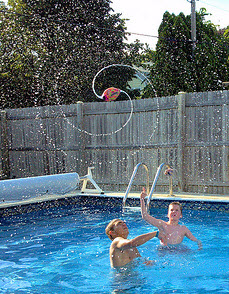
We spent a great day at Woody’s swimming today, then had a great meal of bombers from the Mt. Carmel festival.  I took a ton of photos using the burst mode on my phone, just trying it out to see if I could capture some interesting shots of Ty diving into the pool, and catching one of the splash bombs as Ty spins it in the air.  It makes a really neat water spiral, so I wanted to see if I could capture it.  Wow, did I ever!  I think these turned out pretty neat!  Rosemary, print out a couple of your favorites on your new photo printer–Let’s see how they look!  Check them out, they’re the first 21 photos in this set.

Flickr Backup

This morning I decided I wanted a create a few photo collages for my website’s header using all of the photos from a specific photo set I have in Flickr–“Swimming at Rosemary’s”.  Since all of these photos were taken on all different dates and years, I didn’t have a single “local” copy of them all in one place, like they are on Flickr–all of my local photos are organized by date taken, and also include all of my “garbage” photos (bad takes, out of focus, etc.)–which are kept for use in photo mosaics when I need them (they make great fillers).  So I set out to find a way to download an entire set of photos from Flickr.  Flickr itself has a lot of options, but this isn’t one of them.

Most utilities of this sort that I found are apps–they’re for Android, iOS, and Windows Phone.  After some searching, I found what I was looking for: FlickrEdit for the PC.  I downloaded it, and it’s not even an installer, just an exe that runs immediately.  It’s very straightfoward and easy to use.  It even connected directly to my Flickr account, only asking for Authorization from Flickr to access my account, which I was already logged into.  Once I accepted, it started loading my thumbnails.  It displays 50 photos per page, so you don’t have to wait for entire sets to load, if you have more than 50 photos in a set.  You can simply select the photos you want to download, or select an entire set, then download it to a specific folder.  It’s pretty quick too–it downloaded my entire “Swimming at Rosemary’s” set (302 photos) all at their original sizes, in about 20 minutes.

FlickrEdit is a really nice app, and it’s a relief to know I now have it available for those times when I need a complete set of photos from my Flickr account, and just knowing there’s a simple method available if I need some disaster recovery of all of my photos some day.  I added a couple new photo collages to my website header, so you’ll probably see them up there once in awhile.  For a few days though, while it’s still super-hot and dry around here, I’m going to leave it on one of them as a static header, just to chill.

More swimming

I wasn’t sure we’d get any swimming in at all today.  The storm heading toward us was huge, and the sky looked pretty threatening, but it must have all went around us, or dissipated, because we ended up not seeing a drop of rain, and all the lawns remain brown.  Kinda looks like Arizona around here now, except for a few neighbors that water their lawns daily.  We even have a burning ban in effect now, and can’t even use grills in the parks “until further notice”.  Even our own firepit is loaded with brush and kindling, but we can’t have a fire because it’s just too dangerous with everything so dry.

Tyler was also much later than we expected, so it was pretty late, but we managed to get a couple hours of swimming in at Woody’s after all.  This time it was Kevin, Tyler and I, and the squishy ball fights were in full force!  I think we all took several pretty solid smacks to the face before all was said and done.  Rosemary took a few photos, and they turned out pretty funny.  It took 3 takes to get a good group shot with everyone smiling, but she got it done!  Take a look.

Take 1
Take 1
Take 2
Take 2
Take 3
Take 3

My PicPlz Leftovers

Here they are.  After I deleted the garbage, I was left with 22 photos from PizPlz.  I didn’t bother with adding the date & times or the geotagging, it was difficult just to decipher the date and time from the data files included in the zip with the photos, so I didn’t bother.  The only one I would be curious about is the “Friggin COLD!” photo taken at Wolfenbuttel Park.  So I checked the EXIF info.  That one was taken 11/20/2010, at 4:35pm.

PicPlz and Meebo are closing up shop. Who’s next?

It’s so sad to see some of my favorite apps going away.  PicPlz – Android’s competitor to Instagram – is going away.  I got the notice to download my photos last week.  I only had a few dozen pics on it, so I’m now in the process of moving them to my Flickr account.  This week it’s Meebo.  Meebo was an IM service, but it was unique in that it also logged you into most other popular IM services and combined their features into a single app, so you only had to login to Meebo to connect to all of your messenger apps.  Needing only one messenger login but having accounts on many of them was pretty sweet.

I think SMS is getting to so popular now, it’s starting to take over as the messenger of choice.   Especially now that you can send pictures through it.  Meebo and PicPlz had another major thing in common though:  They both required some processing and storage, yet they were completely free services.  Whether this factor had anything to do with their demise, I don’t know, but I think it’s an interesting coincidence.

Keep that in mind whenever you start relying heavily on a particular app or service… Do you pay for the service?  If not, be warned.  The service may not be around in the future, if they don’t have a continuous profitable channel of funding.  As for Facebook, it’s not free.  As they say, “If you’re not paying for a product, YOU are the product.”  Facebook is selling you to its advertisers.  Advertisers pay good money to make sure you see the specific ads that appear on the Facebook pages you visit.  And when you start playing one of their games…JACKPOT!  The advertiser and Facebook both make a bundle!

Don’t worry though, Facebook will probably be around for years.  As long as their “products” continue to earn them a lot of money.  But as soon as enough people get smart enough to “do their own thing”, get their own blog or find a better service to connect with their friends and family, then Facebook will have some tough decisions to make.  It’s public now though, which means it’s owned by more that just one or a few people, so does that make it better or worse?  Less likely to fold, or more likely?  I don’t know.  I just wish I could pay a few bucks a month for an ad-free, game-free version of Facebook.  I’d sure feel more comfortable with that than I do with what they have now.

Photo collages

A visit at Hans'A customer of mine turned me onto a new application recently… Microsoft Autocollage 2008!  She was using the trial version and wanted to know if it was safe to use, or if it might have spyware or a virus embedded within it.  I was shocked that this was a Microsoft product I had never heard of before, but it has apparently been out for years.  They’re still selling it, so it hasn’t been abandoned, though it’s still titled “Autocollage 2008”, which most likely means it hasn’t changed in 4 years.

After looking at it a bit and playing with the demo for several days, I decided it was cheap enough for the value it provided, so I went ahead an bought the full version.  It’s very simple to use, and can create excellent results!  You simply feed it a folder full of your photos, and it analyzes them, detects faces in them (and I think objects as well) and then lays them out and blends them together as a collage.  YOU can decide how many photos you want it to use in the collage, and you can also specify “priorities” on the photos you’d most like to include, and it will use those rules when building the collage.  This posting includes a really nice one that I made with it.  The next thing I want to try, is to use turn a collage into an awesome mosaic using AndreaMosaic!

Milwaukee Zoo

I just posted a bunch of photos from Kevin’s field trip to the Milwaukee Zoo we took last Monday.  I chaperoned a group of six 8th-graders (including Kevin), along with another father.  It was a good time.  Lots of walking and ogling of animals.  I took over 500 photos because I stayed in burst mode most of the time.  It enables me to get several continuous shots of the same subject, then later when I view them I can pick out the best ones for posting on the web.  Here they are, my 56 best out of over 500.  I just wish more of the animals had been awake.  Many of them were just sleeping and hiding.  I guess it all depends on when you go. All in all it was a fun trip though.

Uptown Car Show

Uptown Car Show 2012Kevin and I (and Socks) went to the Uptown Car Show yesterday.  It was ok, but kinda small compared to the others we’ve been to.  There didn’t seem to be many cars there this time.  The reserved block between 60th Street and Open Pantry was completely empty, though it was still blocked off from traffic, reserved for the car show.

The music was great (didn’t get the name of the band, sorry), and they had a KPD Canine training demonstration that was interesting.  We walked home after that (Sandy wasn’t available for a rescue pickup) and I was pretty exhausted.

This time, Kevin took all of the photos of the event.  Take a look, I think he did a great job.