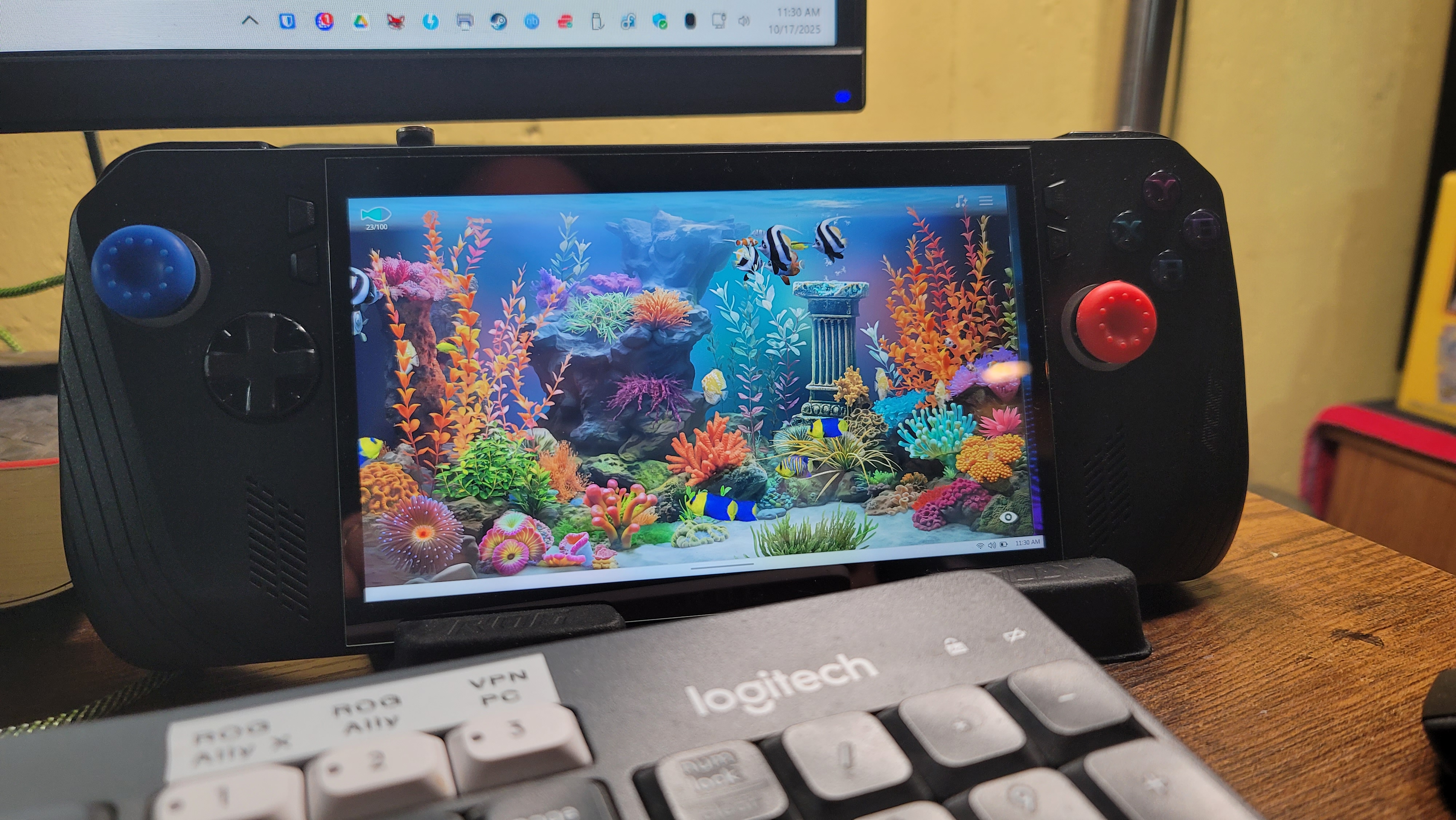
A few posts back (but over a year ago) I wrote about the best handheld PC I’ve ever had. Here’s the link to that post. Well, now there’s a new one. This one looks almost exactly the same as the white one in that photo, but it’s black. It’s the ROG Ally X, and it’s the next iteration in the ROG Ally series. It’s not the most recent, but only one generation older than the latest version, which is called the ROG XBox Ally and the ROG XBox Ally X.
They changed the case just a little and modified the back buttons based on user suggestions and all the minor changes are nice. This model is a little thicker than the ROG Ally, not not too thick as to make it more difficult to hold while playing.
One nice advantage to the thicker case is that the SSD is now a standard size and it also has room for an SSD heatsink – this means it can handle ANY standard SSD. So everyone’s touting the 2TB, 4TB, and 5TB SSD cards as great upgrades. I took it to the extreme though and bought the max – 8TB. Yes, it was a bit pricey, but for me it’s my dream machine now. It holds close to 200 of my favorite games and my entire retro collection – THOUSANDS of retro console and arcade games!
With a nice 1080p 7″ display, this is everything I could want in a handheld. Every game I’ve ever played in my gaming PC I can now play in my hands, anywhere. The battery is even better than the ROG Ally, and it’s more optimized, and since the X-Box version has recently released, the built-in control software, Armoury Crate & Command Center, has recently been enhanced quite a bit with new features and functions, aligning it more with X-Box. The X-Box features don’t interest me much overall, as I’m not a subscriber, but I like and own a lot of the X-Box games, so the more the better.
I’m not sure I ever posted anything about this, but a couple years ago I sold my huge collection of games, consoles, and accessories. I had a few Playstions (3 and 4), a few X-Box versions, and even a Wii and Wii-U, as well as many accessories and physical games for them. They all sold pretty quickly and I freed up a lot of space in my mancave. This makes the retro collections, and the ability to play my games anywhere I want even that much more valuable to me.
I had to keep my Nintendo Switch, as the Nintendo games (like Mario, Kirby, etc.) aren’t available for PC like most other games are – they’re locked to Nintendo (except their older emulated games) and I still wanted access to them. Pretty much everything else I enjoy to play is available in a PC version. So now I’m down to two platforms – PC and Nintendo – and most games are digital as well, so I’m saving a lot of space at home.
Anyway, that’s my update. If you have any comments or questions, I’m checking my site much more often now, so feel free to post a message. I believe my site will also e-mail me whenever anyone posts a comment, I’ll be notified fairly quickly.
I love new tech and gadgets – even at my old age – and I recently found the ultimate gaming handheld. I’ve had a Nintendo Switch for several years, and still do, but this is something completely different. I’ve always been a PC enthusiast, and I use them all day, every day for my job as well. I like playing with the newest, smallest tech, so I buy small but powerful desktop PCs, like Intel NUCs, but I also enjoy the high-end gaming PCs that can handle just about anything you throw at them. Lately I’ve even focused so much of my time on PCs, that I haven’t had any time at all to play any of the gaming consoles I had, which included an X-Box (original version), an X-Box One, a PS3, PS4, a Nintendo Wii-U, and the original model of the Nintendo Switch. So I ended up selling those systems and the hundreds of game cartridges, discs and accessories that went with them.
So these days I’m all-in on PCs (except for the new Nintendo Switch model – since Nintendo hasn’t given in to offering their current Switch games on any other platforms, YET…like most other companies do, I’m hanging onto it for now, just so I can still play the latest Nintendo games. But I digress. I’m all-in on the PC train, which made this purchase a no-brainer: The ROG Ally. To put it quite simply, it’s a Windows 11 Gaming PC in a handheld form factor. That means it’ll run pretty much everything any PC will run, which is perfect for me.
The design of the ROG Ally is really nice, and it feels really nice and comfortable, with a very crisp, clear screen. I’ve spent several hours at a time playing games on it without any issues (except eye fatigue, but that’s a personal issue of mine as I get older, not any fault of the device). I’ve heard that the new version of the Steam Deck, now with an OLED screen, is much better, but it’s still only 800p. The ROG Ally is 1080p, but you can lower it if needed. Same with refresh rate – it’s 120Hz, but can be adjusted as needed, and all of these settings are instantly accessible using a special button to bring up the “Armoury Crate” app, which includes a fully customizable control panel of all of your favorite and most-used settings, including an overlay options very much like Google’s “stats for nerds” option in YouTube. It’ll show specific memory, CPU, FPS, and other details overlayed on the screen, permanently, until you turn it back off. This is very handy for troubleshooting or reviewing app or system performance.
Windows 11 isn’t the best with touchscreen support, but ROG has managed to make it quite usable with their add-on apps and drivers that are accessible from a few added buttons on the device. There was, and still is, a little learning curve involved, but I’m getting pretty comfortable with everything after a few weeks of using it so far. I still prefer to use a Bluetooth keyboard and mouse when doing a lot of configuring and installing of software and games on it, but that’s normal for a new PC. The beauty of it is being able to take it anywhere and be able to play everything I like without having to lug around my heavy gaming laptop everywhere.
I originally purchased the 512GB ROG Ally, which is the better, faster version of their two models with a faster CPU than their other model, then Best Buy had a Black Friday deal on a SSD upgrade specifically for the ROG Ally and Steam Deck handhelds, offering 1TB and 2TB options, so I couldn’t pass up a 2TB upgrade. The install was pretty simple and went flawlessly, I just had to do a “Cloud Restore”, which is an option in the ROG Ally’s BIOS, then I had to restore all of my games and updates again. I hadn’t gotten very far into initially installing all of my games at that point, so it wasn’t much of an issue to start over again. So right now, with the 2TB SSD and a 1TB microSD card I had left over from a Nintendo Switch that I had previously sold, I now have 3TB of storage on my ROD Ally, which is plenty of room for everything I need.
My game collection also includes emulators for many old game platforms and a collection of tens of thousands of classic games from the past that I have amassed over the years, such as thousands of N64, NES, SNES, Sega Saturn, Gamecube, and Atari, all of which run great on Windows 11, so they also work fine on the ROG Ally. This makes it truly priceless for me, literally providing me with every game I own, at my fingertips, anywhere I go with it. I decided to dedicate the slightly slower 1TB microSD card to just my emulators, so I pared down a 5TB portable collection of about 65,000 retro games to just under 1TB. I ended up with about 45,000 games and much less garbage and duplicate games, keeping all of the gems and classics. That’s just 1 TB. The faster 2TB I’m using for the OS, the “Grade A” games and everything else.
The sound on the ROG Ally is also really nice, though I often connect my Anker Soundcore earbuds when I use it, just for the privacy, noise-cancelling, and enhanced audio. At this point I just want to lug this thing everywhere, just in case it might come in handy. I can watch or play anything – Plex for movies & TV shows, YouTube, Spotify… well, you get it, it’s a PC.
To wrap things up, here is my list of the Pros and Cons with the ROG Ally 512GB Handheld:
PROS:
Runs ALL Windows 11 applications and games – Steam Deck runs on SteamOS and only runs compatible Steam Games. This is akin to how the iPad locks you into only running Apple’s App Store games and apps.
Touchscreen – Same size screen as the Steam Deck, but 1080p resolution – Steam Deck is only 800p.
120Hz refresh rate, adjustable as needed.
Power adjustable 10w (Super Quiet) – 35w (Turbo mode).
Lighter than the Steam Deck.
I can remote to it easily, just like a regular PC, whenever needed.
Controls feel nice and are well laid out – all buttons are fully customizable in 2 modes: Gamepad or Keyboard.
Two additional buttons on the back, fully programmable, and two added front-panel buttons specifically for ROG Ally’s settings (Armoury Crate)
CONS:
Learning curve involved with what button mode to use for each game and game type.
Battery lasts 90 minutes to 2 hours with heavy gaming. Using lower power settings can extend that to 4-5 hours though. I purchased as 30,000 mAh 65w fast-charging power bank to use with it, which easily gives me a full day of battery use.
Single USB-C type connection for everything – charging, external display, etc. – and it’s located on the TOP of the ROG Ally, so there’s no way to have a wireless dock connection. Even with a premium dock with fans, multiple USB ports, HDMI, network port, etc., it still requires a short physical wire connected from the dock to the top of the ROG Ally. I highly recommend a magnetic USB-C adapter so a dock or charger can easily be attached and detached thousands of times without ever damaging the port on the ROG Ally at all. (I now always use one of these adapters on my cell phone as well – they’re priceless for ease of use and safety, if you’ve ever tripped over a USB cable before while your phone was charging with it)
When in use, a lot of heat blows from the top vents. This is only a negative for ME though… our two chihuahuas enjoy the extra heat, and often snuggle up with me when I’m sitting on the couch playing games on it.
And the obsession continues! I saw the movie twice already, and it’s much better the second time around. I caught much more that I missed the first time, and I could even watch it again. And again. But I’ll wait for the 4K release and save some money. As my previous post explained, the movie is totally different than the book, and I found this list on the web recently and just HAD to add it to my website for quick reference. I even added a few references that were missing from it. I think it’s pretty complete at this point:

 JimTrottier.com